



This project is not covered by Drupal’s security advisory policy.
Azure Blob Storage module uses Azure Storage SDK and Zip php extension to create backup archive from given by the user directory and uploads it part by part to Azure Blob Storage.
Requirements:
- Azure Storage account and key
- Azure Storage SDK for PHP ( it will be installed with the module through composer )
- Zip extension
Installation:
Install the module as usual, more info can be found on:
https://www.drupal.org/docs/8/extending-drupal-8/installing-drupal-8-mod...
How to configure:
Be sure to enable Azure Blob Storage module which can be uninstalled at production later.
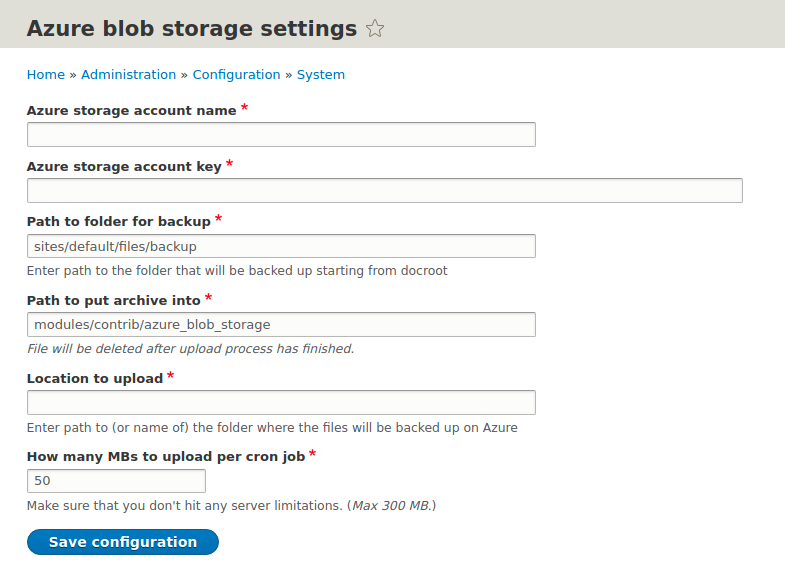
- Go to Azure Blob Storage settings, ( e.g. admin/config/system/azure-storage ):
+ Add your azure storage account name and key.
+ Add your desired paths, cron and azure preferences.
How to use:
- You can run the module manually with drush custom command - drush azure:upload
- If the file is large you must run that command until file is upload and success message is presented
- OPTIONAL - you can config auto upload with cron. ( used for automatic backup )
Add two cron jobs to crontab
+ first for initial start of the process:
0 1 * * * /bin/bash -c "<REAL_PATH_TO_MODULES_FOLDER>/modules/contrib/azure_blob_storage/azure_init.sh" >> <REAL_PATH_TO_MODULES_FOLDER>/modules/contrib/azure_blob_storage/logs/init_log
+ second for every next part of the file until upload is done
*/5 * * * * /bin/bash -c "<REAL_PATH_TO_MODULES_FOLDER/modules/contrib/azure_blob_storage/azure_upload.sh" >> <REAL_PATH_TO_MODULES_FOLDER>/modules/contrib/azure_blob_storage/logs/upload_log
By the idea of Daniel Nikolov
Project information
 Seeking new maintainer
The current maintainers are looking for new people to take ownership.- Project categories: Administration tools, Content editing experience, Media
- Created by bizhev on , updated
 This project is not covered by the security advisory policy.
Use at your own risk! It may have publicly disclosed vulnerabilities.

