

 Come together with the global Drupal community in Rotterdam, 28 Sept – 1 Oct 2026. Sessions, contribution, connection, and Early Bird savings until 8 June.
When added to cart, remove from cart, change status of an order, i have an error such as:
Recoverable fatal error: Argument 2 passed to commerce_availability_change_state() must be an instance of timestamp, array given, called in /usr/local/www/localhost/sites/all/modules/commerce_availability/commerce_availability.module on line 430 and defined w commerce_availability_change_state() (linia 379 z /usr/local/www/localhost/sites/all/modules/commerce_availability/commerce_availability.module).
Commerce 7.11
Availability Calendar: 7.x-4.1
| Comment | File | Size | Author |
|---|---|---|---|
| #3 | product.JPG | 68.04 KB | lamp5 |
| #3 | line item.JPG | 77.22 KB | lamp5 |
| #3 | commerce availability.JPG | 37.75 KB | lamp5 |


Comments
Comment #2
inakilz commentedMaybe you are not configuring correctly?
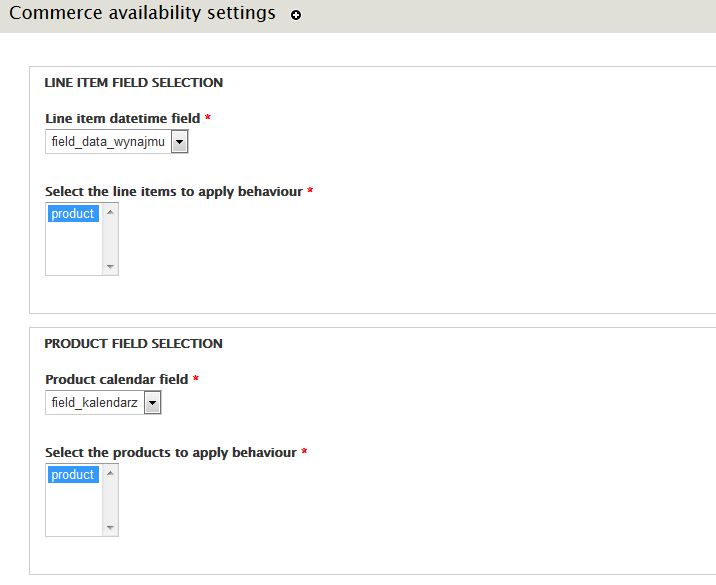
Remember that you need to add a datetime popup field in the line item associate to products and select this field it in the module administration page: admin/config/system/commerce-availability.
Check it, please.
Comment #3
lamp5I think that all is ok. look at the screenshots.
I checked option "Include this field on Add to Cart forms for line items of this type. " in datatime popup field settings.
Comment #4
shasha_s commentedDrupal core 7.38
Commerce 7.11
Availability Calendars 7.x-5.4
Hi inakilz,
i have the same problem. checked the settings - everything like your how todo steps.
Comment #6
inakilz commentedI've fixed the error.
Configuration for the product variations field in the associate line item:
- Select "Add to cart form"
- In its format settings: uncheck "Display a textfield quantity widget on the add to cart form" and set "default quantity = 1" (The module only supports attaching a date range for each product variation).
Others settings:
- It's necessary to check "Include this field on Add to Cart forms for line items of this type. " option in datetime popup field settings in order to see the date selection.
- Jquery >= 1.7 is necessary.
When I have some time I'll try to write more documentation.
Comment #7
inakilz commentedComment #8
lamp5inakilz,
Thx. Now the calendar works but not in order.
When i chose start date for example 21.08 and end date 26.08 and added to cart, it displays a warning
and i see on the calendar booked the first 5 days avaliable in this case from today (14.08) to 19.08.
Comment #9
lamp5Comment #10
inakilz commentedHi lamp5,
The module provides a booking system for rent products for a specific date not a range of days. For example, a shop that offers an online service that provides designer dresses and accessories rentals for future events.
An example of shops that work with this business model:
https://www.renttherunway.com
https://www.24fab.com/
And how they work:
https://www.renttherunway.com/how_it_works
https://www.24fab.com/alquila-tu-look-en-solo-3-pasos
In the settings you can set a number of days marked as reserved for the following days to the current day and a margin of days to ship the product and bring it back.
Comment #12
inakilz commentedComment #13
inakilz commented