

Closed (fixed)
Project:
User Stats
Version:
6.x-1.0-rc1
Component:
Code
Priority:
Normal
Category:
Feature request
Assigned:
Unassigned
Reporter:
Created:
13 Mar 2008 at 14:21 UTC
Updated:
11 Feb 2011 at 13:46 UTC
Jump to comment: Most recent file

Comments
Comment #1
liam mcdermott commentedAgreed, I'd like to include this too (am suprised I haven't raised a feature request myself actually!)
Comment #2
liam mcdermott commentedI've committed an attempt at this. It should be available in the next dev release (happens automatically every day). Give it a test, if this works alright I'll create a Beta 2.
There's no way (that I know of) to retrospectively get a login count, so user_stats just starts counting from when it's installed. If there is a way, let me know. Am afraid I don't have that book you refer to. :)
Comment #3
capellicEXCELLENT! I'll definitely test this out!
Here's the book: http://www.drupalbook.com
The script in the book can't retroactively count either. Every time someone logs in, a row is written to a table with the user ID and a time stamp. Then you simply do counts on the the rows for a given user ID. The timestamps can come in handy for other views, including trend analysis.
Comment #4
capellicI upgraded and everything seems to be working fine. I did have trouble upgrading the module - Drupal kept on showing me the old settings page for user_stats and I don't know why. I finally got the new version to work, but don't know if it was the fact that I closed/opened the browser or cleared the cache or what.
You might want to change "Login count" to "Login Count" to remain consistent in your field naming scheme.
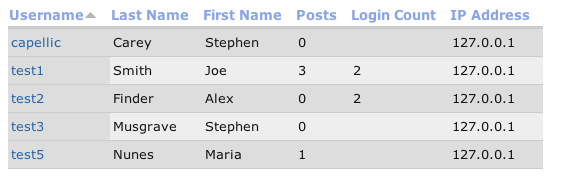
I added the Login Count field to my view. It's attached.
You've saved me some time, do you have a PayPal link?
Comment #5
liam mcdermott commentedThat's an excellent idea. This module is nowhere near as elegant. Thanks for the suggestion, I'll be using it in the next major version.
Oooh, think that might be a bug. Easy to fix though, I'll get onto that. :)
My Paypal e-mail address is payments@intermedia-online.com (is that what you mean?) any donation would be welcome. Glad to hear this module's helping you! :)
Comment #6
liam mcdermott commentedComment #7
Anonymous (not verified) commentedAutomatically closed -- issue fixed for two weeks with no activity.
Comment #8
hmdnawaz commentedEvery time someone logs in, a row is written to a table with the user ID and a time stamp.
I want to know the table name where user ID and a time stamp is written when some one logins?
Comment #9
nimishasharad commented'users' is the table which maintains the user ID and time stamp. Time stamp is maintained in 'login' field. But its not like every time a user logs in a row is written in the table. First entry is made when user registers. Later only 'login' field is updated whenever user logs in. So this field contains the last log in time stamp.
On the other hand if you are using 'User Stats' module, 'user_stats_ips' table contains fields: 'uid' and 'first_seen_timestamp'. Row is entered only once in this table when the module encounters a user for the first time. Later in 'user_stats_values' table the 'count' field is incremented showing the number of time a user logged in.
Comment #10
nimishasharad commentedThis is a contributed module that I have created. It generates reports showing user login trends yearly, quarterly and monthly.
This may help you..
http://drupal.org/node/1058594