I'm using Drupal 7.4 and Name field module 7.x-1.2.tar.
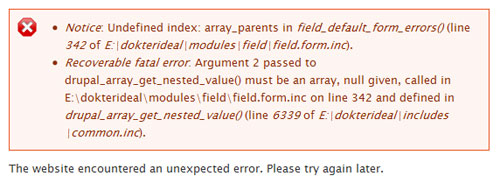
If I click on the "Required field", I can't save the node. I got this error message.
Notice: Undefined index: array_parents in field_default_form_errors() (line 342 of E:\dokterideal\modules\field\field.form.inc).
Recoverable fatal error: Argument 2 passed to drupal_array_get_nested_value() must be an array, null given, called in E:\dokterideal\modules\field\field.form.inc on line 342 and defined in drupal_array_get_nested_value() (line 6339 of E:\dokterideal\includes\common.inc).
The website encountered an unexpected error. Please try again later.
It also doesn't show the comma sign between the name and credential.
Should be shown as "John Doe, MD" but it shown as "John DoeMD"




Comments
Comment #1
alan d. commentedI found a similar bug when using the profile2 module. I will take a better look at this tomorrow.
In regards to the display, double check and report back what the format settings are.
Go to www.mysite.com/admin/config/regional/name/settings and see what the three separator fields are.
The default recommended ones are:
1) A single space: ' '
2) A comma followed by a space: ', '
3) Empty by default, not used in any default formatters.
Then check the format string used: www.mysite.com/admin/config/regional/name
The main default string works well, ((((t+ig)+im)+if)+is)+kc and should dynamically adjust to any combination of name components.
correction
Looking at this, then yes there is a bug in the default settings, the string ((((t+ig)+im)+if)+is)+kc should be ((((t+ig)+im)+if)+is)+jc
Comment #2
badrun commentedSorry, I was wrong.
What I meant is I got "John DoeMD" instead of "John Doe MD". But it's fixed after I changed the settings. The setting default was single space, comma, and no space.
Another problem came out. I created a new content type that contain name field. I inputted the name and save the node. It won't show the name.
To show the name, need to go to manage display, change the label into inline, then the name shows. After doing this, it will always shows, even when I created a new node using the same content type.
Comment #3
alan d. commentedWas this a Drupal 6 to 7 upgrade or just a clean Drupal 7 install?
And at this point in time, is the only remaining issue the required bug now?
Comment #4
badrun commentedIt is a clean Drupal 7.4 installed using Acquia Drupal Stack.
"And at this point in time, is the only remaining issue the required bug now?"
There are 2 bugs
1. Error message when the required field is ticked.
2. Doesn't show the name field.
Comment #5
alan d. commentedI have located the error in the default formatter settings that is bypassing the field formatter until you explicitly specify a formatter in the display settings.
The error messages thing is something that I can not replicate at the moment.
These are the steps I took:
Add a new name field to an existing content type
Instance setting: Required
Save content type
Edit existing OR new content item
- if empty, then error "field is required"
- if partial, then error "also requires xxx"
- full - no error & node saves
I've only tried single value fields.
If you took any other steps, please let me know. Otherwise what field / entity based modules have you installed and enabled?
Cheers
Comment #6
badrun commentedDrupal 7.4, Acquia stack, Name field module 7.x-1.2.tar.
MySQL database in C: drive
Drupal files in E: drive (external 500G hard disk) <- maybe this is the problem? Not a common installation.
UPDATE: I installed fresh drupal 7.4 (no installation modification like above scenario), aquia stack, name field module 7.x-1.2.tar. No other module, only name field module. I still have the same error when I save content (when required field is checked).
Attachments: other field modules installed, manage field page, add content page, error message.
Comment #7
alan d. commentedI can not replicate, but it looks like the entity system still has some growing up to do. I've reverted the code from the recommended Drupal 7 field hook approach and changed this to a delta 0 #required flag at the FAPI level, good old trusted code from Drupal 5.
The side effect is that required validation is only done on the first element in multiple fields, if that field is missing and other fields exist, a required validation error is triggered. Something that happens with all fields :(
Give it 10 or so hours and the next dev release should have these changes.
Cheers
Comment #8.0
(not verified) commentedAdd more detail