

 Come together with the global Drupal community in Rotterdam, 28 Sept – 1 Oct 2026. Sessions, contribution, connection, and Early Bird savings until 8 June.
Drupal Version: 7RC4
Drupal Theme: Bartik 7.0-rc4 & Seven 7.0-rc4 (same effect on both themes)
Overlay: None
OS: Vista
Browser: Firefox
Browser Version: 3.6.13
Curlypage Config: Default config position setting was Absolute and display was as per images. When testing, changing to 'fixed' changed position (to outside screen) and seems to be stuck in that setting, even when changed back to 'absolute'
The default position for the right hand side, up & down, appears slightly out of position as per attached pictures.
Hope this all makes sense, not the best explanation ever!
thanks
| Comment | File | Size | Author |
|---|---|---|---|
| #5 | ABSOLUTECurltunwrapedoff.jpg | 374.29 KB | serg2 |
| #5 | ABSOLUTEcurlysmalbitoff.jpg | 361.28 KB | serg2 |
| #4 | curlypageCSS.png | 297.5 KB | manfer |
| #2 | beforeScroll.png | 102.11 KB | manfer |
| #2 | afterScroll.png | 95.8 KB | manfer |




Comments
Comment #1
manfer commentedThis is very strange. I understand you are experimenting that issue even with the sample curlypage provided with the module with default configuration.
Curlypage position is based on two div layers appended to the body of the document (it is a direct child of the body) positioned absolute or fixed in one of the corners. The css properties involved: position absolute or fixed, right, left, top, bottom, width and height, are crossbrowser compatible and should be correctly positioned in all major browsers.
I'm going to try Vista with that exactly version of firefox but I can't understand which could be the problem.
Thanks.
Comment #2
manfer commentedI have tried firefox 3.6.13 on windows vista 32bits (i cant test 64bit version) and looks correct.
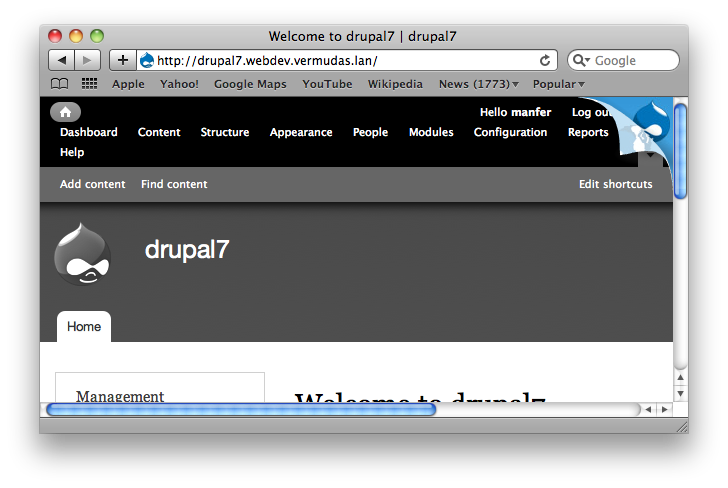
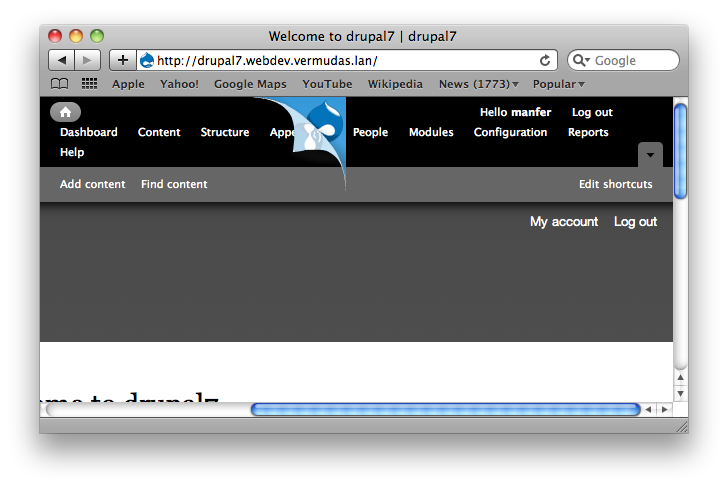
The only way I can reproduce something similar (and it happens to all browsers) is by resizing the browser window so its width is smaller than the 'document' width. In that situation an horizontal scroll bar appears. If you scroll the curlypage scrolls too and a gap appears between the curlypage and the right side of the browser. I attach two images showing the problem. In the first image the curlypage is in its correct position but the window width is too small and horizontal scroll bars are present. On second image the document has been scrolled to the right and the curlypage scrolls too.
I can't do much about this problem with horizontal scrolling as it is the way absolute positioned layers work.
Fixed positioned curlypages will not show this problem as fixed positioned layers stay on its correct position (relative to the viewport) even when you scroll.
If this is not the problem you are experimenting, and maybe it is not because you have even an issue with fixed positioned curlypages, I can only think of a problem on 64bit version of Vista. Could you confirm if you are running Vista 32bits or 64bits? You can see that on Control Panel -> System and Maintenance -> System.
Comment #3
serg2 commentedHello, thanks for looking into this. I am running Vista 32bit. I have tried with all Firefox add-ons disabled in case there was something conflicting and I also disconnected my monitors so that I had one display, however the misplacing persisted. It is out of position in both absolute and fixed. In absolute it was as shown in previous images provided and in fixed it was marginally off screen, made more apparent when rolled over and a third of the default Drupal logo off screen.
As I seem to be the only one experiencing the problem, and you have been unable to reproduce, maybe it is best for you to postpone/close the issue. I should be live (fingers crossed) in about a week so you can view it in action and would be able to get a better idea. I am of course presuming it is a conflict with CSS which will show itself (rather some sort of weird bug solely in my system)
Many thanks for your help and time Manfer
Comment #4
manfer commentedIf you use firebug you can inspect CSS of curlypage div layers. If some other CSS rules are modifying curlypage CSS properties, it should appear just there. Curlypage layers are at the end of the body.
I attach an image as an example.
Comment #5
serg2 commentedI replicated your screen shot and you can see the curlypage disappearing off screen. Changing from Fixed to Absolute had no effect.
I uninstalled the module and then reinstalled 7.x.-1.x-dev and then 7.x-1.0-rc1. They both produce the same positioning which surprised me as the original issue i had with positioning was that they were positioning inside the screen and now they display out side.
Comment #6
manfer commentedThough I can't see all the CSS inherited from body, it looks correct. I don't think any of the inherited properties from body will be affecting curlypages.
The curlypage layers has flash objects inside. If there is any CSS rule for objects that could affect curlypages either. For example:
Maybe this is not your problem at all but I have realized that those kind of inherited CSS could affect curlypages so I'm adding more specific rules to curlypage objects and div layers.
Is your theme bartik without any modification?
Comment #7
serg2 commentedYes, only modification is to the color scheme.
Comment #8
manfer commentedYou can try 7.x-1.0-rc3 release in which I added the CSS rules to avoid possible inherited CSS properties problems. Specific rules where added for margins, paddings, borders, position, left and top properties, to avoid inherited values.
But I think this is not the case in your situation. If you are using bartik with only color scheme modification there should not be such a problem with inherited CSS.
I have no more ideas now on which could be the problem.
If you find something different, please report it. And if you are able to test in another computer with Vista OS could be interesting too.
Thanks.
Comment #9
manfer commentedI can't reproduce this, but I'm going to maintain this active a little more.
If other users can test curlypages from Vista OS and report their tests, would be helpful.
Thanks.
Comment #10
JSCSJSCS commentedI found that I have the same situation in FF 3.6.17 and IE8. The issue stems from scaling the browser window. With browsers at 100%, then all is fine, but hit CTRL+ or CTRL- and the Curly page moves left or right from the corner. It does not scale well.
Comment #11
manfer commentedComment #12
manfer commentedThis should be fixed with new releases 6.x-3.6 and 7.x-1.1
Comment #13
manfer commented