

 Come together with the global Drupal community in Rotterdam, 28 Sept – 1 Oct 2026. Sessions, contribution, connection, and Early Bird savings until 8 June.
Problem/Motivation
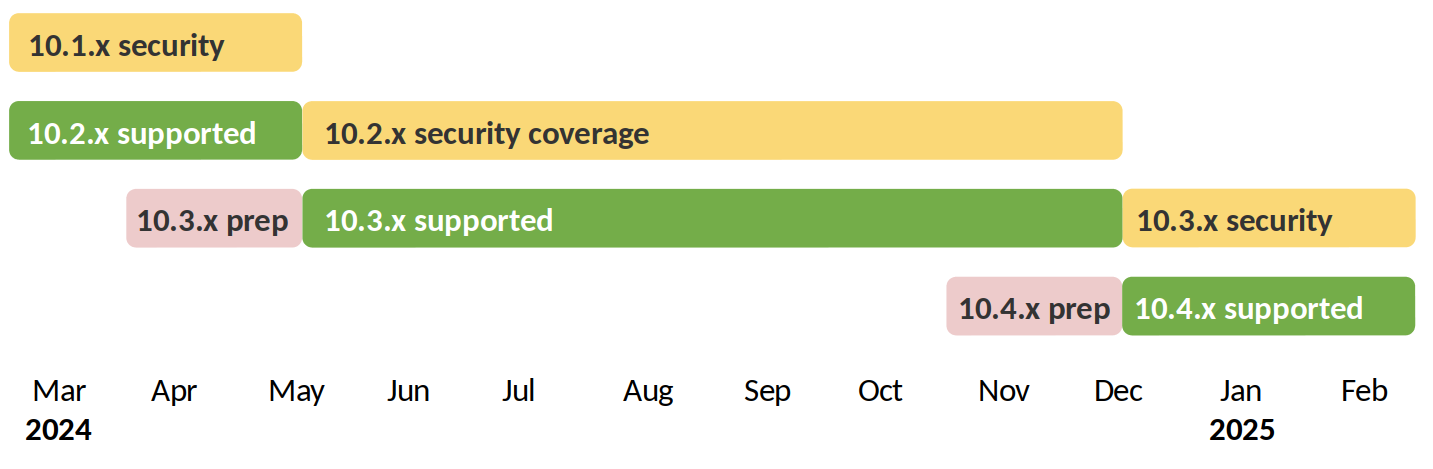
It would be nice if the "Sample release schedule" chart on the Release process overview could be generated from a template file in a drupal.org Git repo.
A script should automatically update with new versions every time we update the scheduled dates, and generate an embeddable SVG-file.
For comparison here are some related release charts.
- php.net
- devguide.python.org
- symfony.com
- phpunit.de – it's actually a table, not a diagram, but the light background colour of table rows assists better understanding
Proposed resolution
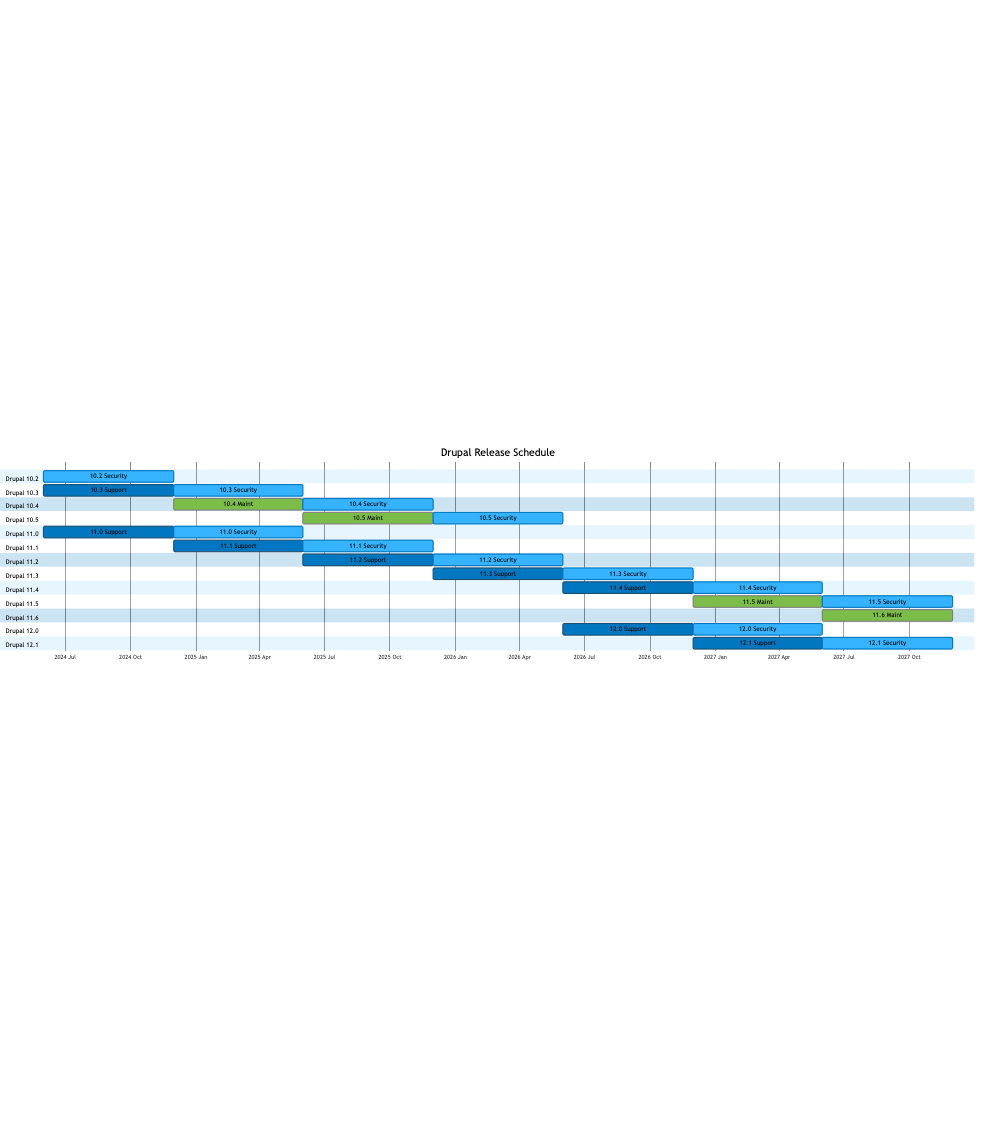
Create a Gannt chart template with Mermaid. This should match the existing sample schedule.
See the latest version
Remaining tasks
A new dynamic approach for updating dates was requested, rather than manually updating, and attempted summarised below (see comments #85 - #96 for details).
Ideally, the dates can be automatically updated, based on the scheduled dates (ProjectSecurityData) and we will load the relevant data from a YAML file.
Handled in this issue:
- The new YAML format.
- A core script to write the YAML data to the markdown file, which we run to update it every time we update the scheduled dates.
- Method additions to load the necessary dates from the YAML file and use them in the warning/error calculations.
Handled in separate issues (these issues needs to be created):
- Deprecate the D9 constants in a separate issue (they should have been removed in 10.0.0 anyway; we just didn't have things to replace them with yet). (Logic related to constant magic-matching would still be deprecated in this issue.)
- A script to update specific schedule entries in the YAML given input (we could integrate this into release tagging to allow the tagging script to optionally update release dates and EOL dates based on when exactly releases come out).
- Possibly (not sure about what we'd want to do yet): Additional improvements that will somehow allow this to entirely replace the core release schedule handbook page, so we don't have to maintain the dates in two places.
YAML file format details
- A YAML file containing raw information (see format below)
- From this file we'd generate the constants on
\Drupal\update\ProjectSecurityData(just the constants and the logic to read those obviously) - We'd generate the mermaid file from the information on that file too
Example format, with just a few entries:
'10.2':
  Security:
    start: YYYY-mm-dd
    end: YYYY-mm-dd
    end_warning: YYYY-mm-dd
'10.3':
  Support:
    start: YYYY-mm-dd
    end: YYYY-mm-dd
  Security:
    start: YYYY-mm-dd
    end: YYYY-mm-dd
    end_warning: YYYY-mm-dd
'10.4':
  Maintenance:
    start: YYYY-mm-dd
    end: YYYY-mm-dd
  Security:
    start: YYYY-mm-dd
    end: YYYY-mm-dd
    end_warning: YYYY-mm-dd
For example, the above file (it's just truncated) would generate all the constant below (even if only some are needed):
- SECURITY_COVERAGE_END_DATE_10_2
- SECURITY_COVERAGE_ENDING_WARN_DATE_10_2
- SECURITY_COVERAGE_END_DATE_10_3
- SECURITY_COVERAGE_ENDING_WARN_DATE_10_3
- SECURITY_COVERAGE_END_DATE_10_4
- SECURITY_COVERAGE_ENDING_WARN_DATE_10_4
And then we'd somehow use that info to build the graph.
| Comment | File | Size | Author |
|---|---|---|---|
| #63 | mermaid-diagram-2024-02-23-103826.png | 36.04 KB | fjgarlin |
| #62 | mermaid-diagram-2024-02-23-103826.png | 57.54 KB | fjgarlin |
| #54 | Screenshot 2024-02-22 at 11.33.23 AM.png | 143.88 KB | smustgrave |
| #42 | 1.2-compact-non-lts.txt | 1.88 KB | ressa |
| #42 | 1.1-LTS-non-compact.txt | 1.61 KB | ressa |
Issue fork drupal-3399348
 Show commands
Start within a Git clone of the project using the version control instructions.
Or, if you do not have SSH keys set up on git.drupalcode.org:
 changes







Comments
Comment #2
andypostLooks nice and outdated pic is confusing
Comment #3
andypostComment #4
ressaThanks @andypost, do you think I should make "Minor release development and preparation" also?
I just see I switched the words for two blocks, here's an updated version.
Comment #5
andypostHaving security coverage make more sense, thank you
Comment #6
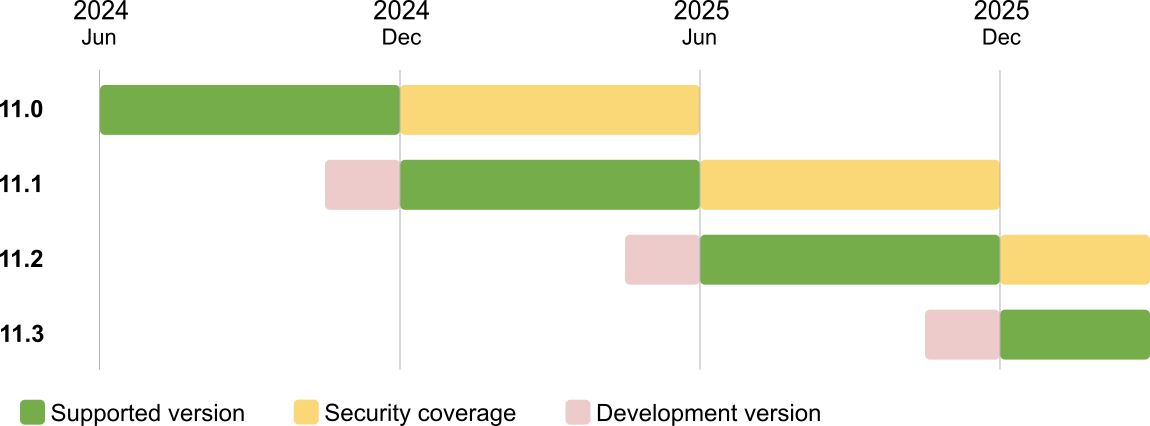
ressaI ask because we should probably update both at the same time.
I made a fresh SVG version in Inkscape, aligned to a 1200px grid. I also swapped the font to Arial, something everyone has on their machine.
Comment #7
ressaArial bold is better, I think.
Comment #8
ressaThe black text on pink and yellow background might need a slight smoothing, to dark grey.
Comment #9
smustgrave commentedImage appears slightly blurry in the preview but opens crystal clear.
Though wonder if core is the place for this ticket?
Comment #10
ressaThanks @smustgrave, I added the diagram to the Overview of the release process page. I am attaching the template SVG-file, with a
.txtextension on that page and here for future updates.Shouldn't Minor release development and preparation also be updated to keep the same design? Is the type and time for the different tasks still correct?
Comment #11
ressaHere's the Minor release development and preparation. Are the dates correct?
@smustgrave: Feel free to move the issue, if you think there is a better place for it.
Comment #12
quietone commentedThat for working on this!
For some background, the images on this page were originally designed as and meant to be a examples only. They were never meant to have current dates or version numbers. And there was text on the page to explain that. The current dates information should be in one place, at Drupal core release cycle.
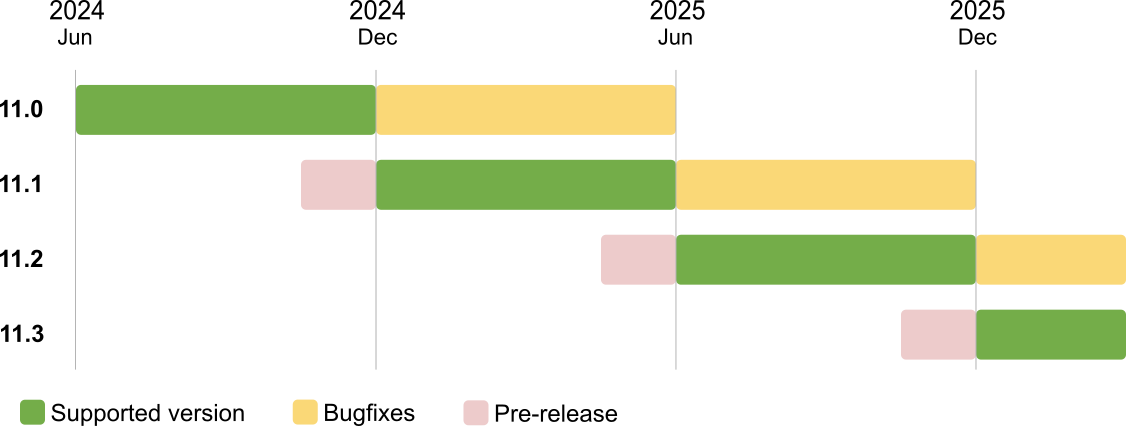
What I've been (slowly) working towards is generic, overview of the process information on the Overview page and the details on Drupal core release cycle. This is similar to Symfony release pages. This work was on hold waiting for #3238652: [policy] Decide how long major Drupal versions should be supported and #3361260: [policy, no patch] Adopt a regular two year release cadence for major releases. I have been thinking there could be two images, a generic one and a specific one where the specific one is on Drupal core release cycle page and regularly updated as dates change.
Looking at the image it is hard to figure out the release month of, say, 10.3. It also shows 10.4 and there has been no decision that there will be a 10.4 release. If this is an example, that is fine, but the sentence explaining that it is an example has been removed. I am confused.
What would help is to make it obvious that we use a 6 month cycle. That means the months should be just June and Dec. But, there is a possibility of a September major release so maybe the 4 quarters would make sense, Mar/Jun/Sep/Dec? And it should span a major release to show the length of time a release is supported.
Other things I prefer is the releases down the left hand side, similar to https://symfony.com/releases. And like the symfony example, can we see what this looks like without the text in each row and a key to explain the color usage.
I do wonder if this image is still needed. I expect it was helpful when it was created but surely most developers understand an alpha/beta/rc workflow. What do you think? If the image is kept my first though is that it should have week granularity to show the details that in the text.
Finally, I have restored the sentence on the Overview page about the release numbers being an example because the decision has not yet been made about a 10.4 release.
I am also tagging for release manager review.
Comment #13
quietone commented@ressa, thanks again.
Since this is working with release info pages and dates, it can stay in the core issue queue.
Comment #14
ressaYou're welcome @quietone :-)
I removed the "This is an example text", thanks for restoring it.
I agree, and was a bit puzzled by the May/Dec cycle in the two original charts. Perhaps they should have been June/Dec?
I agree, it looks better with the version to the left. Though in this first sketch, I tried with just June+Dec, but I can add "Mar" and "Sep", if you think? I used the dates from the #3238652: [policy] Decide how long major Drupal versions should be supported for Drupal 11, to align with actual proposed dates.
Yes, you're right, developers probably know this, so it's probably not necessary.
Comment #15
ressaReduced space between versions in left side and lanes, I'll update the example in previous comment.
Comment #16
catchI like the look of #14 and think it's a good improvement in general.
If we use full HTML for the documentation page, we can use embed the SVG inline, that way release versions and dates could be edited along with the page rather than even needing to update the file (unless we tweak the actual design). It limits how many people can edit the page but this is not one that gets loads of changes except right now.
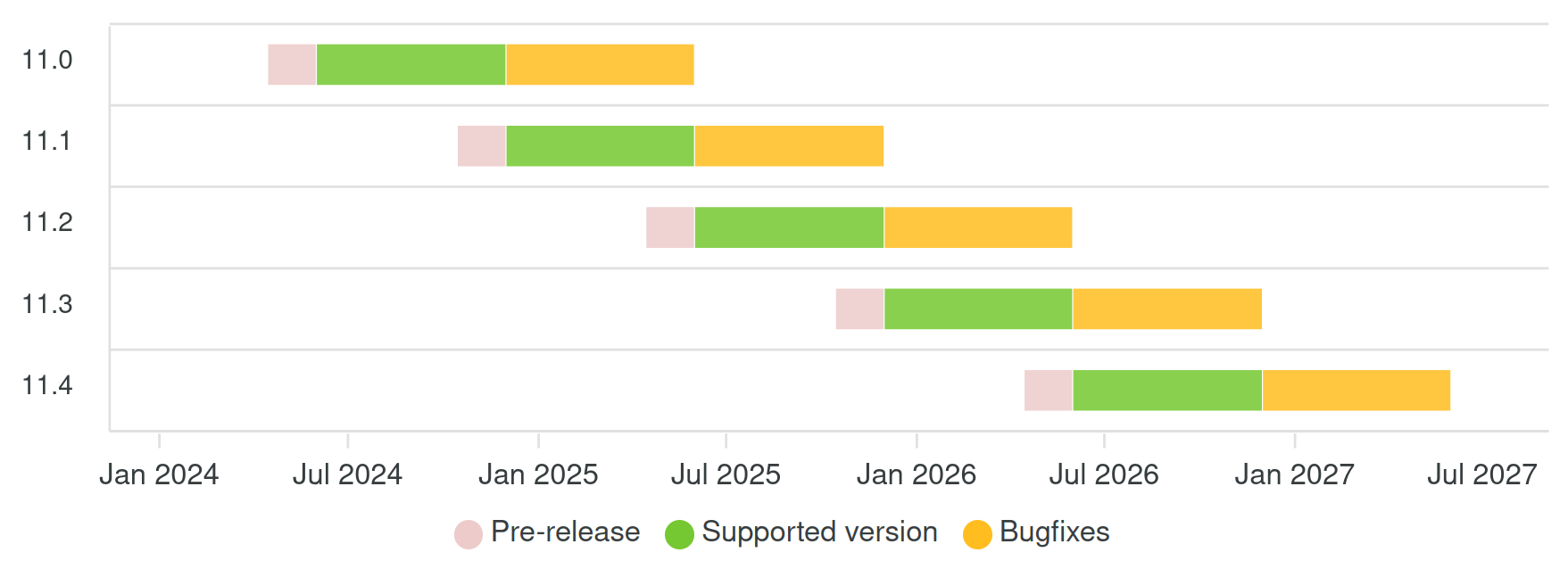
I think we should consider changing 'Supported version' to 'Bugfixes', because with #3238652: [policy] Decide how long major Drupal versions should be supported we're also introducing the concepts of supported/maintenance/LTS for minor releases on the old branch when a new major comes out.
Would also change 'development version' to 'pre-release' maybe since that closer matches that period, it's the development version 4-6 months earlier than alphas start.
Comment #17
ressaUsing inline SVG's would be nice, for much easier updating. I updated the chart with your suggestions, which do make more sense, and here it is.
Comment #18
ressaFrom Discuss Overview of the release process.
Until SVGs can be embedded, a SVG-template is not relevant, so closing this issue.
Comment #19
ressaComment #20
ressa@effulgentsia mentioned in #3238652-123: [policy] Decide how long major Drupal versions should be supported that it would be great to use something like Apexcharts "... to generate an SVG given an input array of versions and dates."
The Timeline Charts > Multiple series – Group rows is probably the one to use, so here's a proof of concept I made, which can be expanded on.
Perhaps someone with more JavaScript skills can figure out how to force date labels to be "June 2024", "Dec 2024", etc. as well as other improvements? :-)
To see the interactive html-page, and the SVG it can export, download the files and remove the
_.txtextension.Comment #21
gábor hojtsyThese graphs look visually so much better than what we have with google drawings :) On the other hand security support does not seem to be reflected? @catch suggested "consider changing 'Supported version' to 'Bugfixes'", not to change security coverage to bugfixes, which is incorrect.
Comment #22
catchThere are two ways we can embed SVGs now:
1. Put the SVG in a git repo somewhere on Drupal.org, then embed it using img tags. This means the workflow for changing the image would be an MR.
2. Embed the SVG directly in the HTML, this requires full HTML so would make the page editable by many less people.
Both of these are barriers to changing the image, but there are also barriers to changing the image now. I kind of like the idea of it living in a git repo.
Comment #23
ressaThanks @Gábor :) And you're right about the naming, I updated 'Supported version' to 'Bugfixes'. The 'Pre-release' category could be removed, if it adds too much clutter?
I added some more versions, and tried but failed to set the labels at the bottom to "Jun 2024", "Dec 2024", etc. It looks like a bit of JavaScript may be needed, see Datetime axis tickAmount issue and xaxis docs. Maybe someone can help with that?
Having the SVG in a Git repo and updating via MR sounds like a fine solution to me.
Comment #24
ressaComment #25
ressaSome dates for D10 were wrong, here's an updated version, added in the Issue Summary.
Comment #26
smustgrave commentedCurious how come D9 only went to .5 and D10 is going to .5 but D11 is going to .7 ?
Comment #27
ressaThat's a good question @smustgrave :)
It's because I based it on the chart from Release process overview > Sample release schedule
I added it in the Issue Summary.
Comment #28
smustgrave commentedSo since this is for a drupal.org page wonder if it belongs in this project instead. If I'm wrong please move back.
Comment #29
quietone commentedThis does need to remain in the core issue queue, it is specific to core and not other Drupal projects. The documentation for Drupal core development policies and practices, which includes the release pages, is separate from the Document project page.
Comment #30
smustgrave commentedSo what's next step needed here?
Comment #31
fjgarlin commentedGitLab md files support mermaid syntax out of the box, and among them, Gantt syntax: https://mermaid.js.org/syntax/gantt.html
Maybe we can have an actual md file in core with this information. I'll try to make a POC that can be modified by anyone interested.
Comment #33
fjgarlin commentedExample from the above comment (copy/paste from one of the examples):
- View file: https://git.drupalcode.org/issue/drupal-3399348/-/blob/3399348-svg-templ...
- View code: https://git.drupalcode.org/project/drupal/-/merge_requests/5897/diffs
Note that the image generated is an SVG.
I don't want to derail this issue, so if this is not appropriate for this issue, just ignore.
If it's something that might be good, then we will just need to tweak the markdown file as needed.
Comment #34
fjgarlin commentedI adapted the MR to contain real data that was provided by @kimb0 a while ago in slack and fell through the cracks.
Result: https://git.drupalcode.org/issue/drupal-3399348/-/blob/3399348-svg-templ...
If we want to have this be part of Drupal core, I think this MR might be ready for review.
Comment #35
ressaGreat find @fjgarlin! This solution certainly makes updating and adding dates much easier.
Months and lines
The question is which months to show at the bottom, but that can change, I think ... Like @quietone commented:
Theming
The grey colors are a bit bland. It looks like Gitlab defaults to the neutral theme. I looked at the options with https://mermaid.live/, and maybe
forestis the best? I have updated the MR, to test it.Default theme, grey

Forest theme

What do you think?
More compact, possible?
As it is now, the diagram gets a bit tall, so it would be nice to have the minor versions on the same line, like the two 10.3 releases (10.3 support, 10.3 security). I tried Output in compact mode but that doesn't work ...
See also Multiple tasks on one line #1996.
Comment #36
catchOne idea I had was starting the new major version at the top of the diagram each time (would mean removing the version label from the left)
This kind of thing:
Comment #37
fjgarlin commentedNot entirely sure how to build what @catch suggested.
Since we're playing with themes/colors, we can set the colors we want too (throwing some Drupal-blue into the theme):

https://git.drupalcode.org/issue/drupal-3399348/-/blob/3399348-svg-templ...
Comment #38
ressaLooks good. Do you know if it is possible to define the months, and maybe show minor versions (like 10.3) on the same line? (See my comment https://www.drupal.org/project/drupal/issues/3399348#comment-15369925)
Comment #39
fjgarlin commentedThe only way to display these "pills" in the same line is by using the compact mode that you also tried (at least from what I've been reading), and I'm not sure about how much control we have over them (about which one goes where).
Comment #40
ressaI see some define each pill manually, setting x,y coordinates for each individually, but that kind of handheld approach defeats the purpose.
Do you know if the month lines can be set to for example June and December, which are the typical release months?
Comment #41
fjgarlin commentedIt seems like you can't control which one to start from.
You can tweak

tickInterval 1monthand that'll show all months.I tried and it doesn't look too good:
But it seems like it always starts with January.
So setting the value to 2 or 3 won't work either:
- 2: Jan, Mar, May, Jul...
- 3: Jan, Apr, Jul, Oct...
I tried as shown in the image and reverted the change.
Note that you can go to https://mermaid.live and tried the code of this MR to play with it as needed.
Comment #42
ressaThanks for testing the options for months, it seems like it's not possible ...
I tried to create a version with minor releases in the same swim lane.
https://mermaid.live/edit#pako:eNqFls1uozAUhV_FYoTYkMo2kFQsm053bCbVSJXYO...
The downside is that the LTS-background as seen in the image in comment #37 is not possible:
https://mermaid.live/edit#pako:eNp9VUtv4jAQ_itWVhGXtLJNgCrH0u1pkVYbtFKlX...
But it didn't work too well I think, since the LTS-region is marked up as white. A user will think that the "LTS" in the image in comment #37 refers to the blue area below, not the white area above.
I am attaching both versions, in case we want to carry on with one or the other -- is it better with two branches?
EDIT: After reading Discuss Drupal core release schedule I realized I can just add the links, so I just did that.
And yes, the editor at https://mermaid.live is pretty cool! It would be nice to be able to test CSS as well.
PS: I see a typo in my new image: In the compact version, the second "12.1 Support" should be "12.1 Security" :) (fixed in the attached txt file)
Comment #43
frobThat's great. Do they need to show June and December? The dates should still be listed in the tables. How many releases need to be in the chart?
I would only expect the +/-3 months of releases. I could see showing the rest of the D10 release cycle.
Comment #44
smustgrave commentedWould we say this is ready for release manager?
Comment #45
ressaThanks for pushing this forward @smustgrave, your Needs Review Queue Initiative is a stroke of genius.
I updated the Issue Summary, adding outstanding decisions.
Comment #46
ressaComment #47
catchI like the idea of using mermaid for this, and maybe having a file in the core repo. Not sure which of the two diagrams I prefer although the compact one feels easier to scan.
Comment #48
fjgarlin commentedOk, let's try that in the MR then.
Changed the MR based on #42 compact mode.
You can view it here: https://git.drupalcode.org/issue/drupal-3399348/-/blob/3399348-svg-templ...
Comment #49
smustgrave commentedNot sure if I did something wrong but applied the MR and viewing the file I still see just the code and not the markdown.
Edit
Using phpstorm which renders markdown
Comment #50
fjgarlin commentedBack to Needs review I assume.
Comment #51
smustgrave commentedStill just seeing code
Comment #52
ressaHave you found a way to integrate https://github.com/mermaid-js/mermaid in PHPStorm @smustgrave? Because I only used https://mermaid.live, and the result on Gitlab, not any local dev tools.
@fjgarlin: Could you render the diagram locally?
Comment #53
poker10 commentedHave you tried this plugin? https://plugins.jetbrains.com/plugin/20146-mermaid . I have not, but maybe it can render it.
Ref: https://www.jetbrains.com/help/phpstorm/markdown.html#diagrams + https://www.jetbrains.com/help/writerside/mermaid-diagrams.html
Comment #54
smustgrave commentedusing that plugin this is what I see
Comment #55
fjgarlin commentedSame here. I think that seeing just the code in the editor is fine.
In order to render it locally, we'll need a plugin in the editor.
Maybe we can add a note inside the md file above or below the graph saying that mermaid is supported by GitLab and that to view it locally you'd need a plugin, but not sure that it is needed. ie: even if markdown viewer is very common in most editors, it's not always present.
Comment #56
smustgrave commentedIn gitlab it looks perfect.
Comment #57
smustgrave commentedI think a link to the gitlab page would work.
Comment #58
fjgarlin commentedLink added. The link points to the 11.x page where the file does not exist yet.
https://git.drupalcode.org/issue/drupal-3399348/-/blob/3399348-svg-templ...
Comment #59
smustgrave commentedI think this looks good! And good timing
Comment #60
catchThis needs an issue summary update, both of the examples look outdated to me compared to the version in the MR. i.e. it's still linking to mermaid.live but should probably be https://git.drupalcode.org/issue/drupal-3399348/-/blob/3399348-svg-templ... ?, not sure whether the screenshot also needs to be updated.
One question I have is how we incorporate this into https://www.drupal.org/about/core/policies/core-release-cycles/release-p... - I think we would still have to either copy and paste the svg code into full HTML or a file then embed it, both of which require high level permissions on d.o, or screenshot it. These are not significant issues compared to the current situation where we have to regenerate a png but needs thinking about. It would be great if we could embed the svg from the .md file directly but that seems unlikely to be supported.
Overall this is very close to the overall structure of the current image, just easier to update. I did have ideas about trying to make it more compact, but seems like they don't work in practice and I didn't have a proper go at implementing myself either, so for me what's in the current MR seems like a good plan.
Comment #61
fjgarlin commentedWe can download a PNG image from the mermaid.live page. Maybe we can just document it in this same file?
I'll add it to see if we wanted, otherwise we can discard it.
Comment #62
fjgarlin commentedI added the instructions to download the image, see here: https://git.drupalcode.org/issue/drupal-3399348/-/blob/3399348-svg-templ...
I also update the issue summary. Not sure if I should remove the tag and bring it back to RTBC.
Comment #63
fjgarlin commentedComment #64
smustgrave commentediS appears to be updated in #63
Comment #65
catchRe-titling.
I am very in favour of this issue but still a bit stuck on how to embed it on Drupal.org, I think the answer is we can't and need to use it as an svg generator still, but maybe long term we can find a way to rework the docs to allow this.
Comment #66
alexpottCommitted and pushed f31a2704ea to 11.x and 3c52d04cdb to 10.3.x. Thanks!
Comment #71
alexpott@catch pointed out this still has the "needs release manager review" tag and so I committed it prematurely.
Comment #72
kim.pepper🖐 I'm putting my hand up for issue credit for this one as I wrote the original mermaid that was posted to slack (see #34)
Comment #73
alexpottComment #74
quietone commentedI have finally been able to look at this.
The first thing that I see is that the colors have changed. I think they should be the same as the existing colors. We should be continuing to follow the practice of green for fully support, yellow for maintenance and red for end of life used in the PHP community. See the links at the end of this comment. And more importantly the colors should agree with the Drupal sample release schedule.
The chart should also have a footer with something like, 'Dates are subject to change.' with a link to https://www.drupal.org/about/core/policies/core-release-cycles/schedule for the most up to date information.
I then applied the diff. The file is not a pleasant read in an editor. It is mostly a wall of code but I understand why it is that way. But I didn't even realize there was a section "Export graph as image' until I scrolled.
I then went to edit the mermaid file. The editor does not allow me to right-click and copy which is annoying. It is easy to copy the existing sections to add a new one. But it is clear to me that I need to read the mermaid docs to fully understand the format.
I think it is important that the chart includes a statement that the dates are subject to change. I searched a bit for that but didn't find anything. I hope someone else does find it.
And finally, the file name is 'releases' needs some thought. It could mean this is a file listing all releases. Right now I lean to 'releases calendar' which I found at https://symfony.com/releases.
Comment #75
fjgarlin commentedThe current color scheme was made to match a bit more Drupal (and Drupal.org) colors. I will change it to your suggested one.
The main file is still markdown, so we can add things before and after the graph easily.
I'm working on your suggestions at the moment.
Comment #76
fjgarlin commentedI think that all feedback from @quietone at #74 has been addressed.
Result: https://git.drupalcode.org/issue/drupal-3399348/-/blob/3399348-svg-templ...
Back to needs review.
Comment #77
smustgrave commentedAppears to be a random JS test failure, reran and all green.
Believe feedback and questions are answered. Link in 76 still looks good
Comment #78
quietone commented@fjgarlin, thanks for the updates.
As stated in #74, I still think we should be using the existing color pattern current shown at, https://www.drupal.org/about/core/policies/core-release-cycles/release-p....
Why has the latest version introduce coloring some rows in an alternating pattern. This is not something done on the related project linked to in #74. Personally, i find it very distracting. What is the purpose of this?
Comment #79
fjgarlin commentedNo purpose, it's just a default. It seems to be by mermaid based on the chosen colors.
The previous version also had it, it was just blue: https://www.drupal.org/files/issues/2024-02-23/mermaid-diagram-2024-02-2...
I don't know how much control of it do we have to be honest. I can play with it a bit and see if I find any option for this,
Comment #80
fjgarlin commentedI tried to remove the background stripes completely, I couldn't.
I tried pretty much all color/background related variables from here https://mermaid.js.org/config/theming.html#theme-variables and there are some colors that are just generated and cannot be changed.
So the closest, less-distracting thing that I could get was a green/white striping (it goes green-derived-from-primaryColor, white, tertiaryColor, white, and then repeat). We have control over the tertiaryColor, but that's about it.
New version: https://git.drupalcode.org/issue/drupal-3399348/-/blob/3399348-svg-templ...
Comment #81
quietone commented@fjgarlin, thanks for explaining the row coloring.
Is it possible to use a non green or yellow color for the alternating rows so it doesn't seem associated with the data? Perhaps a light gray?
Still to address is the color scheme change mentioned in #74 and #78.
Comment #82
fjgarlin commentedI managed to find an undocumented color property to be able to control three colors and try to match the coloring from here: https://www.drupal.org/about/core/policies/core-release-cycles/release-p...
See the latest version: https://git.drupalcode.org/issue/drupal-3399348/-/blob/3399348-svg-templ...
--
The lighter green is derived from the primaryColor and cannot be made white or transparent as far as I know, so it cannot be changed to light gray without changing the primaryColor to light gray, which in turn would change the color of the "Support" pills.
Comment #83
smustgrave commentedBelieve the color change has been addressed. Still rendering just fine for me.
Comment #84
quietone commented@fjgarlin, thanks for continuing to adjust the diagram!
Comment #85
xjmThis new file currently duplicates information about end-of-life dates found in
core/modules/update/src/ProjectSecurityData.php, meaning release managers would have to update this in two places every release.Can we come up with a way to consolidate that, perhaps by refactoring
ProjectSecurityDataand using a script to generate the Markdown file?Comment #86
xjmAlso, just a nitpick, but the filename should be
RELEASE-CALENDAR.md, notRELEASES-CALENDAR.md. :)Comment #87
markdorisonWhat if we moved the relevant data to a YAML file?
ProjectSecurityData.phpcould load it from there and we could create a script to modify the markdown file. I believe as things are currently configured it would still have to be run manually when those dates change. I'd love to be told I am wrong though!Comment #88
fjgarlin commented@xjm (or anybody that knows the answer really) - I fail to see the connection between the data in that php file and the data displayed in this calendar.
I’m trying to think of a programmatic way of using the constants but i don’t see overlap in versions nor dates. Maybe I don’t know enough about that other file.
Also, if you see the code of the graph, it’s going to be real hard to find a way to automate things. Right now it seems very handcrafted.
I think we’d need to know more about the other file to be able to address the feedback. Also, should we do that here (based on the scope of the issue) or maybe commit this and then do a follow up?
Some clarification would be great.
Comment #89
xjmI think #87 is a great suggestion.
@fjgarlin The dates are the same dates; they are tied exactly to the expected release, end of bugfix support, and end of security support dates for the expected minor releases. You just don't see the connection in the current values because we have not set an end of life for Drupal 10 yet. Every time we do a release outside the most basic schedule and every time we issue a new major, we will have to update both these sets of dates. It will be extremely easy for them to get out of sync or show wrong information unless we abstract it, and that would add yet more tedious manual overhead for release managers.
For example, there's a reasonably strong chance 11.0.0 will come out in August, and a possibility that 10.5 will receive security support for more than six months. Both places would need to be updated in both these scenarios. (The UI should still start issuing warnings about using 11.0.0 after mid-December, for the existing file, and its support bar should only be 4-ish months long until that same mid-December date, for the new file).
Having a cleaner way to enter the data so it can be parsed and exported to both places, plus adding a script to do so, would reduce the maintenance overhead of adding this.
Thanks!
Comment #90
xjmSaving some credits.
Comment #91
fjgarlin commentedOk, so, if I understand this right, we'd have a yaml file with raw information (will suggest a format at the end of the comment), and from this file we'd generate the constants on
\Drupal\update\ProjectSecurityData(just the constants and the logic to read those obviously), and we'd generate the mermaid file from the information on that file too, right?Will a format like this work? (I just included a few entries)
For example, the above file (it's just truncated) would generate all the constant below (even if only some are needed):
- SECURITY_COVERAGE_END_DATE_10_2
- SECURITY_COVERAGE_ENDING_WARN_DATE_10_2
- SECURITY_COVERAGE_END_DATE_10_3
- SECURITY_COVERAGE_ENDING_WARN_DATE_10_3
- SECURITY_COVERAGE_END_DATE_10_4
- SECURITY_COVERAGE_ENDING_WARN_DATE_10_4
And then we'd somehow use that info to build the graph.
I still don't know how but I want to validate that the approach above is what is expected.
Comment #92
markdorisonThat would work, but I would advocate for replacing the constants with methods that would load the data from the YAML file directly. That way, the only thing we need to generate manually (or ideally in a build step) would be the markdown file.
Comment #93
fjgarlin commentedYeah, they don’t need to be constants in the new implementation, i was mostly comparing them that way due to the current implementation. It’s probably easier with methods.
We won’t be able to update the file via CI but we can provide a script that will update it as @xjm suggested.
—
I’d like to have a green light on the approach above before starting, given that there was already a lot of back and forth and work on this issue (even RTBC several times) and we now need to build a whole different thing. I’m fine with this, I’d just like confirmation on the suggested approach (probably from @xjm) so we’re clear on the expectations too.
Comment #94
catchA script that will update it is good - we already have various core committer scripts for branching new releases.
I don't like the idea of generating the markdown file because that would make it hard to edit other aspects of it, but updating it based on the YAML file seems handy to me.
However it's @xjm who has maintained the release charts in the past, so as @fjgarlin said in #93, she's more likely to spot any flaws than me.
Comment #95
xjmThat proposed YAML format is nice and clean, +1.
I also agree with the proposal to deprecate the existing constants and replace them with methods as per #92. AFAIK this data is only ever displayed to administrators on status reports, so it's not in the critical path and loading them from yaml is fine.
So we would have in this issue:
And separate issues:
Comment #96
xjmNW to implement the new approach. Thanks!
Comment #97
ressaFingers crossed, that this issue may still happen, perhaps after the GitLab migration is completed?
Meanwhile, I was looking for Drupal EOL info, and https://endoflife.date/drupal was the first result. I think it could be simplified, so I created the MR Simplify and show Drupal same way as TYPO3 and Joomla #9113, feel free to lave a comment :)
Comment #99
ressaThe users are still in need of a simple diagram, to clarify the Drupal cycles, and it would be fantastic to get this issue pushed over the goal line:
From https://www.drupal.org/forum/support/post-installation/2026-05-05/core-r...
If the Mermaid-based diagram with cycles were available the user could have seen that Drupal 11.4 is supported one year from release.
Comment #100
catchWell that user is correct though?
Minor releases are supported for one year, but they're released every six months. So while you have one year to update from release x to release y, you need to plan to update every six months. The one year support just means that exactly when you do this relative to the release date is more flexible.
If you really, really wanted to avoid this, you could skip a minor release - so 11.2 -> 11.4, 11.4 -> 11.6, but that would mean timing site updates to more or less the day that 11.4 or 11.6 are released - otherwise if you miss that, 11.2 or 11.4 drops out of security support. We'd never advise sites to follow that pattern because it adds additional risk that they'd end up on an unsupported minor release.
Comment #101
fjgarlin commentedRe pushing this issue, up until comment 85 this even went to RTBC and is a single file, easy to read and edit, But from comments 85 - 96 a whole new dynamic approach was requested, and it's not straightforward.
I don't think I have the time to tackle this, but anybody can take it.
Comment #102
ressaTechnically speaking, I think their assumption is not correct ("no way of avoiding upgrading every 6 months") since you can in theory install Drupal 11.4 June 2026, and it will be supported until June 2027, which is closer to 12 months than 6 months.
Thanks for fleshing out different theoretical workaround scenarios, with skipping a Minor. Like you write, they might work, but will also leave the site in unsupported territory.
Another option could be to plan for a "Minor Update Festival" every year around the next relevant release date, where a few weeks are dedicated to two fast Minor updated in close succession, two weeks before and two weeks after. If the 11.6 release is 15 June 2027:
But I of course agree that it is not best practice, and you should update to next Minor half-yearly, to keep up to date on the latest Minor release.
Thanks for feedback @fjgarlin, I have updated the Issue Summary in an attempt to clarify the remaining tasks, and hopefully someone can pick up, and complete the great work you already did to create the Mermaid diagram.
Comment #103
baluertlUpdate links to good examples.