

 Come together with the global Drupal community in Rotterdam, 28 Sept – 1 Oct 2026. Sessions, contribution, connection, and Early Bird savings until 8 June.
In the edit mode formatting of the images not rendered correctly
When using ImageResize plugin (added via custom module), resizing image, aligning left or right with text wrapped, it would render correctly in front end, but when going back to make more edits, the render of the content with images is completely messed in the edit box up and looks like all the formatting of the images placements and image sizes are lost. If not making any changes and even saving the page looking messed up, images and content it still renders properly in the front end.
Steps to reproduce
1. Add any content with wysiwyg field
2. Add some text and image
3. Resize image using 4 handles, align right or left with text wrapped or align image to be in the middle.
4. Save content and preview.
5. Content looks good
6. Go back to make more edits and notice that images dont look right and text no longer wrapped around the image.
7. Note: in the front end images size and formatting still look good.
Proposed resolution
Remaining tasks
User interface changes
API changes
Data model changes
| Comment | File | Size | Author |
|---|---|---|---|
| #10 | img element figure style width with %px.png | 158.31 KB | vlyalko |
| #7 | js_error_2.png | 105.93 KB | vlyalko |
| #6 | ckeditor5_add_ImageResize_plugin_line_368.png | 233.4 KB | vlyalko |
| #5 | plugin_custom_module_structure.png | 90.26 KB | vlyalko |
| #5 | js_error.png | 142.74 KB | vlyalko |
Issue fork ckeditor5-3247974
 Show commands
Start within a Git clone of the project using the version control instructions.
Or, if you do not have SSH keys set up on git.drupalcode.org:
 compare




Comments
Comment #2
vlyalko commentedComment #3
vlyalko commentedComment #4
wim leersFirst: work is happening in #3224652: [drupalImage] Add ckeditor5-image's imageresize plugin to allow image resizing to support this by default :)
Second: you created your own CKEditor 5 plugin! Exciting! 😄 Can you share your plugin definition? 🙏 In fact … can you post your code as a merge request over at #3224652: [drupalImage] Add ckeditor5-image's imageresize plugin to allow image resizing? 😄
Third: sounds encouraging, which is why I wonder if there are any JS erors when you do ?
Comment #5
vlyalko commentedHi Wim, this would be so great if image resize feature was included by default. Thank you for an amazing work you do.
This is the screenshot of the js error i see when i inspect editor.

I will include my code here for now, while figuring out how to add my code as a merge request to the issue you posted above.
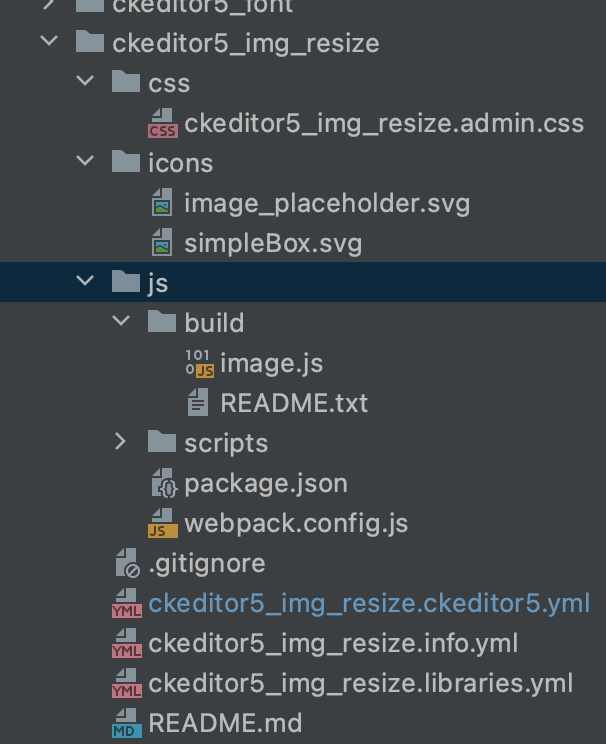
ckeditor5_img_resize.ckeditor5.yml
ckeditor5_img_resize.libraries.yml
Comment #6
vlyalko commentedWim, I have added a custom module to add image resize plugin. I can add a zip file with the module here.
Also, Image resize feature also working if i edit this file web/modules/contrib/ckeditor5/ckeditor5.ckeditor5.yml by adding
image.ImageResize to the plugins section. Please see screenshot attached. I can make that change and create a merge request for this change. Please see line #368
Comment #7
vlyalko commentedI uninstalled all the other ckeditor5 custom plugins I have created and only enabled ckeditor5 image.ImageResize.
There is a new js error

Comment #8
vlyalko commentedUpdates:
I had those js errors, because i had named my plugin module incorrectly. I guess there was a conflict the way plugin was named and plugin's libraries. I have updated those and js errors are gone. Console is clear.
Image resize is still working the way i described in this issue.
Comment #9
vlyalko commentedWim, I have added merge request here https://www.drupal.org/project/ckeditor5/issues/3224652
Please let me know if I did what you asked me.
In my local I have created custom plugin modules to make ImageResize work.
In merge request I have updated contrib ckeditor5 module ckeditor5.yml file to add a new plugins
Comment #10
vlyalko commentedWhen image is resized, style width of the figure element has style="width:##%px" if inspect element and remove px, image size is showing correctly in the ckeditor backend

Comment #11
vlyalko commentedI figured for the imageResize to work in the backend (edit mode), "optional" config.image.resizeUnit needs to be set to 'px'
if set to '%', which suppose to be a default, it still not working in the backend.
I tried to still set config.image.resizeUnit to '%', in backend it still not working correctly, it is adding %px to the percent number for the style width attribute.
It is working with config.image.resizeUnit set to 'px', which is a good news

Comment #12
wim leersThe screenshot in #11 is not working. But I think you're referring to #3249592: [drupalImage] <img width> upcast assumes HTML5: px unit, but HTML4 allowed % unit, which you opened for that specific problem. Bumped that up to critical.
Thank you for opening that merge request, looking at that now! 😊
Comment #13
wim leersComment #15
wim leersImageResizeplugin a week ago.I believe there's nothing else left to be addressed here! 🥳
@vlyalko, you can/should stop using your custom module to add
ImageResizenow! 😊