

 The 2026 Drupal Business Survey is open. Your response will help shape the future of the Drupal business ecosystem.
Problem/Motivation
We need to build a system which allow us to use processors on data sources.
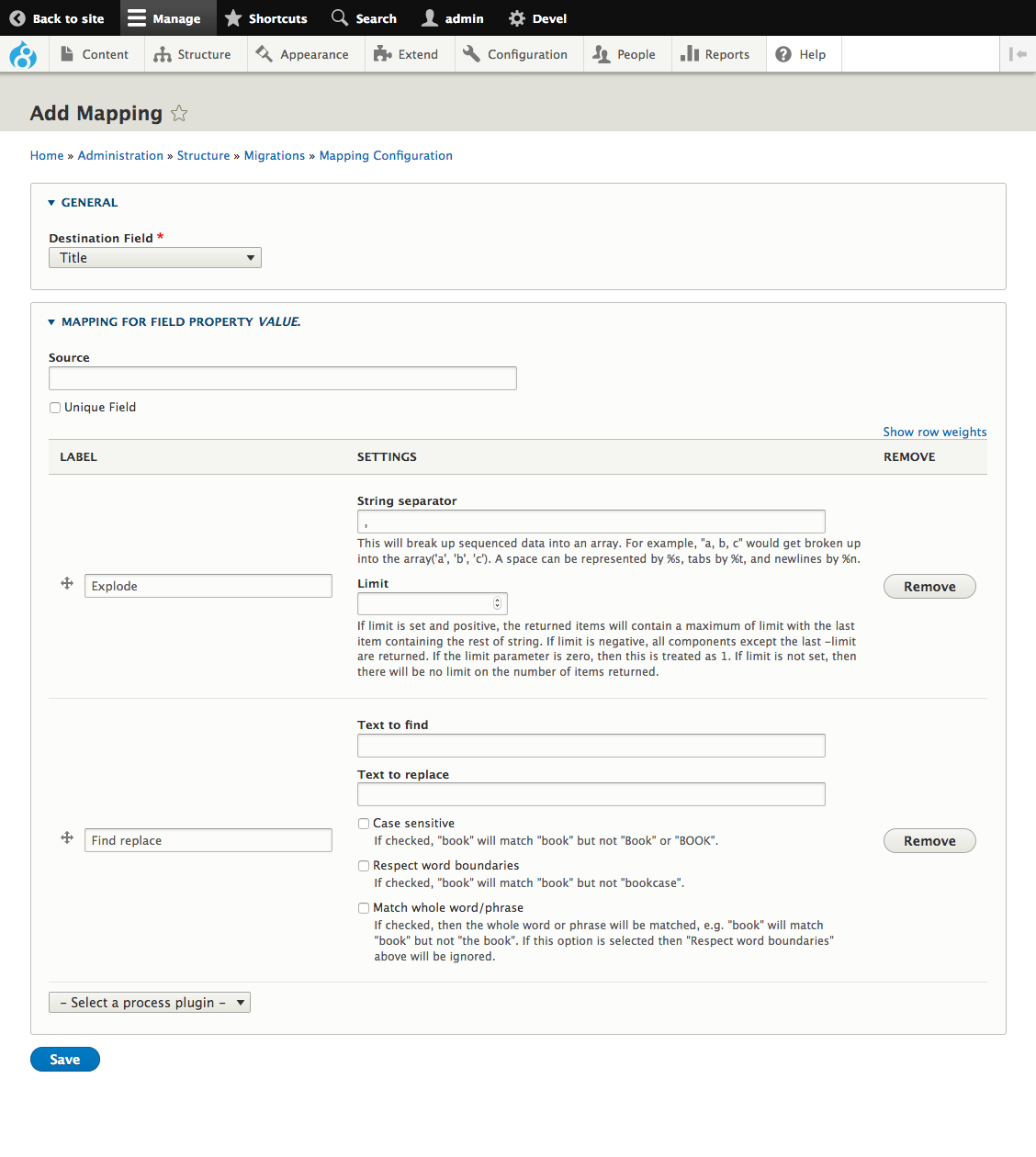
When adding/editing a mapper, the goal is to have an UI on this page to add multiple process plugins:
Developer required skills
- Knows what Migrate process plugins are.
- Knowledge about the Form API and AJAX.
Additionally, to fix the things that are currently broken in the process branch:
- Advanced knowledge of Form API (one of the issues is passing information correctly to subforms)
- Knowledge of test framework in Drupal (including javascript tests).
- Basic knowledge of Migrate (how to setup a migration with YAML files)
Remaining tasks
-
Fix the following bugs:
- Deleting a mapper does not always work, specifically if the mapping is saved as "foo/bar" instead of "foo".
- For the Body field funny things happen when trying to add process plugins for them: plugins added for "body/summary" are added to "body/value" instead. Though after saving, they do get listed under "body/summary".
- When emptying mapping for a subfield - for example "body/format" - the mapping does not get removed on save.
- Add test coverage for the bugs mentioned above:
- Deleting a mapper: unit test.
- Adding process plugins for the body field: functional test or functional javascript test.
- Emptying mapping for a subfield: functional test
Steps to get started working on this issue
- Checkout the latest 8.x-1.x-dev
- Apply the latest patch of this issue.
- Download the following dependency modules:
- Migrate Plus
- Migrate Tools
- Tamper
- Enable the modules Feeds Migrate UI, Migrate Tamper and its dependencies.
- Go to
/admin/structure/migrate. - Click the "Add migration group" button.
- Fill in the form for adding a new migration. For example:
- Label: "Feeds migration"
- Description: "Migration group for testing the Feeds Migrate module"
- Source type:"various"
Save the form.
- Go to
/admin/structure/migrate/manage/feeds_migrations/migrations. - Click the "Add migration" button.
- Fill in the form for adding a new migration. For example:
- Label:
XML migration - Migration Group:
feeds_migrations - Data parser: Data parser plugin:
xml - Data parser: XML item selector:
/root/row. Do not enter anything in field "File Location" you can add the source later, when creating a Feeds Migrate importer. - Destination: plugin:
entity:node - Destination: Content type:
Article
The rest you can leave to the defaults.
- Label:
- Click on the new created migration on the list.
- Go to the tab "Mapping".
- Click the button "Add mapping".
- Select a destination field, for example "Title".
In the fieldset "Mapping for field property" you'll see an UI like this:

Code instructions
The main file in which works need to be done is in feeds_migrate/src/MappingFieldFormBase. This class is responsible for providing mapping configuration per field property.
| Comment | File | Size | Author |
|---|---|---|---|
| #66 | error#65.txt | 4.29 KB | rkoller |
| #65 | body before the patch.png | 15.7 KB | rkoller |
| #62 | feeds_migrate-process-3002362-62.patch | 202.46 KB | megachriz |
| #57 | interdiff-3002362-51-57.txt | 11.03 KB | megachriz |
| #57 | feeds_migrate-process-3002362-57.patch | 193.43 KB | megachriz |
Issue fork feeds_migrate-3002362
 Show commands
Start within a Git clone of the project using the version control instructions.
Or, if you do not have SSH keys set up on git.drupalcode.org:
- 3002362--foundation-feeds
 changes, plain diff MR !1





Comments
Comment #2
irinaz commentedComment #3
irinaz commentedComment #4
irinaz commentedComment #5
irinaz commentedComment #6
etroid commentedGiven the new UI direction we're headed in https://www.drupal.org/project/feeds_migrate/issues/3002361 I would propose the following process plugin configuration UX:
Summary on mapping overview:
Per mapping show/edit all process plugins (i.e. tampers):
Comment #7
etroid commentedhttps://www.drupal.org/project/entity_import has a working mapping interface which supports a number of process plugins. Use this for inspiration.
Comment #8
etroid commentedComment #9
megachrizI've worked on connecting Tamper with Migrate process plugins: https://github.com/Etroid/feeds_migrate/pull/11
This is without the UI, currently.
Comment #10
irinaz commentedComment #11
megachrizI've updated the issue summary with instructions so an other developer who knows his/her way around in the form API is able to work on this issue.
Comment #12
benjifisherI will take a stab at this at BADCamp.
Comment #13
benjifisherI am updating the "getting started" steps:
Comment #14
jamesdixon commentedFrom what I gather work is moving ahead on these features here:
https://github.com/Etroid/feeds_migrate/commits/process
Tests are not passing on this branch at the moment it seems because of differences between the d.org testbot and the github test bot and their composer syntax.
Comment #15
megachrizMartin made adding/removing multiple process plugins work. After his work, the Tamper integration needed to be updated and that's what I did today.
Details of the changes:
Saving the configuration does not work yet. I get the following error when I try to save the process plugin configuration:
I haven't looked at the details of this error because @benjifisher might already be working on it. He reported on Slack that he might work on this issue this weekend.
Comment #16
megachrizWith the current code in the process branch, I believe adding a migration is broken. Uploading patch with all the changes in here to run tests.
Comment #17
megachrizThis could fix some of the test failures and also fixes some of the coding standard issues. I will commit it later to the process branch.
Comment #18
megachrizChanges from #17 are added to the process branch.
Comment #19
megachrizWorked a little on fixing the tests that are failing. They are still failing, but that's because saving new mapping (even without configuring process plugins) doesn't work correctly anymore.
The methods that the test
\Drupal\Tests\feeds_migrate\Kernel\MigrationMappingFormis testing no longer exist. So I think this kernel test should be completely revised.Comment #20
megachrizA week ago I tried to investigate why tests are failing. I reported about it on Slack:
I’ve looked at fixing the ‘add/edit mapping form’ in the process branch, but that seemed to be quite complicated.
See screenshot for which part of the page is the main form and which is the subform:
Comment #21
megachrizI feel I'm getting into circles trying to make progress on the issues/bugs introduced in the process branch on github. Because the amount of code changes that were made is getting huge it's hard to find where in the code a mistake was made and what is 'work in progress' code, meaning code that is part of redefining the structure.
I'll see if it helps if I'll try to break the changes into smaller chunks. Because if a thing/task gets big and beyond manageable, breaking it down could help.
Here is a patch that only fixes code style and comments. That's a start.
I'm only not sure about how we could create more clarity in the process branch on github if we would merge 8.x-1.x back into it after committing this. I often get confused on which code changes happened where when merging branches.
Comment #22
irinaz commented@megachriz, let's use any options that make it easier to move forward with this issue. If we need to break code in github in smaller chunks, we should do that! thanks again!!
Comment #23
megachrizI found a few more changes that are only code/comment style fixes.
When glancing through the code I see that changes are made to the following things:
To me, it looks like not all changes are directly related to adding support for process plugins. I know that at least #4 and #6 are directly related, but not so sure about the rest.
So after committing the code/comment style fixes I found so far, I think it would be good to concentrate on changes made to the form factory (#2) because most of the remaining changes to the migration add/edit form (#1) seem to be directly related to #2. The only other change from #1 seems to be the "save and add mapping" feature, also already being worked on in #3063092: When migration is created change button to "save and add mapping".
And after #1/#2 are finalized, we can move on to other parts. With each part finalized, the amount of code changes coming from the process branch becomes smaller, making it easier for me to see where code might be wrong or incomplete.
Comment #24
jamesdixon commentedThanks for breaking it down @megachriz.
The work so far looks good. I like the direction you're taking with this.
Comment #25
jamesdixon commented@Megachriz mentioned https://www.drupal.org/project/feeds_migrate/issues/3063073#comment-1341... conflicts with this issue. I'm not sure if we should commit 3063073 or leave it until this has progressed further.
Comment #27
megachrizCommitted #23, issue remains open. Since @Etroid made the majority of these changes, the commit is attributed to him.
Comment #28
irinaz commented@megachiz, is there something I should test after this patch before more changes are added ? Thanks, Irina
Comment #29
irinaz commentedComment #30
megachriz@irinaz
What's currently in the dev release doesn't require any specific testing, because it only made changes to code style and comments. Next patches will likely make functional changes. For each of these patches that passes all tests, it would good to go through whole process of creating a migration and perform an import. Basically, take the steps taken on the demo I recorded. Because I'm not sure if the steps taken on the demo have full test coverage yet.
This patch ports the following commit from the process branch: https://github.com/Etroid/feeds_migrate/commit/35bc4ef001f80c90370f81785...
And adds changes from related commits.
Hopefully I found all the changes from related commits to keep tests passing.
It's a small change, but each small step makes the amount of code to review from the process branch smaller.
Comment #31
megachrizOkay, the changes to form factory also requires changes to MigrateFormPluginBase and MigrateFormPluginInterface. Let's add these changes to the patch as well, except for the method
getSummary()which looks like that it won't be required for the form factory changes.Comment #32
jamesdixon commentedFrom @MegaChriz in slack feeds meeting:
Comment #33
megachrizDiscussion on Slack today for this issue:
Process plugin UI
Participants:
megachriz, jamesdixon
Comment #34
irinaz commented@megachriz, patch https://www.drupal.org/project/feeds_migrate/issues/3002362#comment-1341... tested and works. We still have issues with field body, but I believe that it is not related to this patch.
Comment #35
volkswagenchickTagging issue for Global Contrib Weekend Event at SFDUG. Thursday Jan 23.
Comment #36
volkswagenchickTagging issue for Global Contrib Weekend Event at SFDUG. Thursday Jan 23.
Comment #38
megachrizThanks for reviewing, I committed #31.
Next step is to sort out one of the following:
I'll need to take a closer look at the code to see which of these make sense to handle next.
Here is also an update of the code that's left from the process branch, meant to be ported further in bits in this issue.
Comment #39
megachrizI see that in the process branch, the service "feeds_migrate.migration_entity_helper" (MigrationEntityHelperManager with MigrationEntityHelper) is replaced with "feeds_migrate.migration_helper" (MigrationHelper). Apparently this is done to simplify things.
I see that
MigrationHelper::getMappings()doesn't return exactly the same asMigrationEntityHelper::getMappings(). Probably because of changes elsewhere. I also detected a serious issue (bug) in it:MigrationHelper::getMappings()initializesMigrationHelper::$mappingsthe first time when passing a migration. But the next time it returnsMigrationHelper::$mappings, regardless of the migration that is passed to the method. So if you would want to get the mappings for two different migrations, you will only get the mappings from the first migration.So that leaves me to think that the design of MigrationHelper isn't optimal. I wonder why MigrationHelper had to replace MigrationEntityHelper? Maybe because MigrationEntityHelperManager requires a migration ID so it doesn't work for unsaved migrations? I'm thinking: what if we override the Migration class from Migrate Plus with our own, and add methods from MigrationHelper on that? I'll open a separate issue to experiment with that.
Comment #40
megachrizOkay I opened #3108353: Override Migration class from Migrate Plus (and use that instead of MigrationEntityHelper) to experiment with the idea I talked about in #39.
It will make merging changes from the
processbranch harder, though. Code will be getting more diverge.Comment #41
jamesdixon commentedComment #42
irinaz commentedComment #43
megachrizComment #44
megachrizComment #45
megachrizComment #46
megachrizI rerolled the patch from #38 after committing #3108353: Override Migration class from Migrate Plus (and use that instead of MigrationEntityHelper). Oof!
Needs a lot of work because we will be moving away from MigrationHelper now and use
Drupal\feeds_migrate\Entity\Migrationinstead. But I figured starting with a reroll of what's left from the process branch was the first thing to do.Comment #47
megachrizI opened a new spin-off issue for this one: #3126936: Port mapping methods to \Drupal\feeds_migrate\Entity\Migration.
An interesting thing that I found is that
MigrationHelper::saveMappings()is equal toMigrationHelper::deleteMappings(). So I suspect that causes at least part of the issues that the code in the process branch introduced.Comment #48
megachrizOpened another spin-off issue: #3132505: Add unit tests for MappingFieldFormBase and MappingFieldFormManager.
Comment #49
megachrizHere is a patch where the process plugin UI is somewhat working!
The patch includes all the work done in #3132505: Add unit tests for MappingFieldFormBase and MappingFieldFormManager, so the patch is quite big!
There are a few issues left to tackle:
Needs more (automated) tests to tackle these issues.
Comment #50
megachrizChanges:
$defaultThemeto the functional test classes.\Drupal\Tests\feeds_migrate\FunctionalJavascript\Form\MigrationMappingFormTest.Not fixed yet:
Comment #51
megachrizIn this patch I fixed the following things:
I updated the issue summary to reflect the remaining tasks.
Comment #52
jamesdixon commentedRichard will be testing this.
@Richard: Can you please test to see if you're able to submit the mapping form without filling in all required fields (ie: name or label)?
If there are any bugs please document them here so we know what steps to take to cause the bug.
Comment #53
irinaz commentedComment #54
barnes1999 commented@jamesdixon
Looks like you can indeed submit the mapping form without the required fields.
Comment #55
jamesdixon commentedThanks @barnes1999. Which fields are required that can be filled out? If you list them here we can work towards adding validation.
Comment #56
barnes1999 commentedHi @jamesdixon
Apologies for my vague update. It appears the only field that's required to complete the step of adding the mapping itself is its destination. When I try to submit it with the other fields totally empty, Drupal will give the message "Migration mapping for field (field) has been updated," but no mapping will actually be created.
Entering a value for at least one of the fields results in the mapping being created and it showing up in the UI, and the mapping will remain how it is when you first created it even if you try to empty each of its fields, even if Drupal is still saying "Migration mapping for field (field) has been updated." I imagine something that could be done would be some kind of error message that says "No values for mapping entered, mapping item was not created." Does that answer your question?
Comment #57
megachriz@barnes1999
Thanks for finding that bug! I added a test for it in the attached patch which is called
MigrationMappingFormTest::testAddMappingWithoutSource().I also added tests for the other identified bugs:
There is only a single functional change and that is that it is now possible to add mapping without having javascript enabled. This isn't only a nice add-on, but it allows me to write functional tests that run faster (functional javascript tests take quite a lot more time to run).
I also occasionally got errors when reordering mappings, but I have yet to identify the steps to reproduce that.
Comment #58
barnes1999 commented@megachriz
Just ran the test you described after applying the patch. The test results in 3 errors:
Is this the result we should expect or is something up with my instance?
Comment #59
megachrizI've tried fixing the issue of "emptying mapping for a subfield". For example when mapping to the body field, you may want to remove mapping for the property "format".
I ended up changing a lot of code:
It now is:
I wanted to be able to loop through properties. And I noticed each time there was check if
$property != 'destination'. So I moved all properties to an array called 'mapping'. I hope I adjusted the code at all places for this structure.Since I changed a lot, I won't be surprised if I broke some other stuff. So it could be that the patch in #57 performs better and that this one introduces new errors. Let's see what all the tests have to say.
Comment #60
megachrizI focussed on fixing the test failures from Drupal\Tests\feeds_migrate\Functional\Form\MigrationMappingFormTest.
Changes:
getPropertyState()andsetPropertyState()for this to temporary store on the form state which process plugins were added to which property. This made the testDrupal\Tests\feeds_migrate\Functional\Form\MigrationMappingFormTest::testAddMigrationMappingWithProcessPluginForBodyField()pass.Let's see if there are still failing tests now.
Note: I sometimes still notice an issue when reordering mappings. Sometimes I get directed to a non-existing page afterwards. The path then equals one of the field names that I mapped to.
Comment #61
megachrizWell, I quickly found out now what caused that mapping reordering issue. After saving mapping, you got redirected to the mapping overview form, but for some reason with a destination query parameter in the url. For example:
/admin/structure/migrate/sources/xml_migration_new/mapping?destination=bodyWhich resulted into getting redirected to /body after reordering mappings.
I removed the destination query parameter in
MigrationMappingFormBase::save().Also fixed a few more coding standard issues.
I think this patch is ready for review and testing.
Comment #62
megachrizReroll, needed after committing #3147461-14: Automated Drupal 9 compatibility fixes.
Comment #63
rkollerI've applied patch #62 and tried to access the mapping tab in a Drupal 8 installation I was testing successfully in before and got the white screen in return with the following log entry:
location:
http://d8.ddev.site/admin/structure/migrate/sources/xml_migration/mappingreferer:
http://d8.ddev.site/admin/structure/migrate/manage/a/migrations/xml_migrationp.s. should the whole message output be pasted or is it the preferred way to go with gist links or attached text files instead?
Comment #64
megachriz@rkoller
Thanks for testing! The error you are getting seemed to be caused by a cache issue. In the patch, changes were made to services and routes. Can you do a cache rebuild and try again?
If the error message is very long, I’d prefer it being attached in a text file. Then I have to scroll less through the issue. And well, it may draw a bit attention away from other things on this issue.
But I think there are no rules on how to share the information, just personal preferences.
Comment #65
rkoller@MegaChriz ahhhh good to know! i try to remember for the future to do a cache rebuild. haven't thought or even knew that changes to services and routes in patches might be the cause for errors as well.
and i can confirm that the mapping tab is now accessible without an error! i will play around with it. on a side note. one issue from the list i am writing up after the bof got solved with that patch already (see the screenshot).
Comment #66
rkollerRan into a recoverable fatal error. Was struggling to get the import working with my XML example and switched to JSON. With that setup I managed to run an initial import creating three nodes. Mapping a
unique_idtoIDandnametotitle. FortitleI've applied a single process plugin toconvert case(first character to lowercase). After the import worked I've addedcharacters to trimremoving the spaces in the string and added a secondconvert case(convert to uppercase - just for test purposes). Then I went to the importer settings and changed the settings toupdate existing content. when clicking save the fatal error happened (see the attached txt file)Comment #67
irinaz commentedI applied patch #62, successfully added "rewrite" tamper, but I was not able to remove it. When I click "remove" button nothing happens. If I remove plugin and then add new plugin, it will get replaced. I can successfully add several plugins. I did not test yet if plugins actually tamper data.
Comment #68
megachriz@irinaz
Can you provide the exact steps that lead to the issue of not being able to remove a Tamper plugin? If I add the “Rewrite” tamper to the “title” field, and click “Remove”, the “Rewrite” tamper does get removed. Did you add other Tamper plugins too? To which field/property did you add the Tamper plugin?
Comment #72
megachrizCommitted #62 with small changes.
@ipumpkin
Can you post your changes in a new issue? And document what you changed/fixed?
Comment #74
ipumpkinHi @MegaChriz, thanks for your module, i has some more updates in other issue, kindly need your review.