
4.4. Uninstalling Unused Modules
Uninstall the core Search and History modules, as well as the core Activity Tracker module if you installed it in Seção 4.3, “Installing a Module”, to reduce overhead.
- You must have at least one unused module on your site that you want to uninstall, such as the core Search module.
- If you want to use Drush to uninstall modules, Drush must be installed. See Seção 3.2, “Concept: Additional Tools”.
You can use the administrative interface or Drush to uninstall modules.
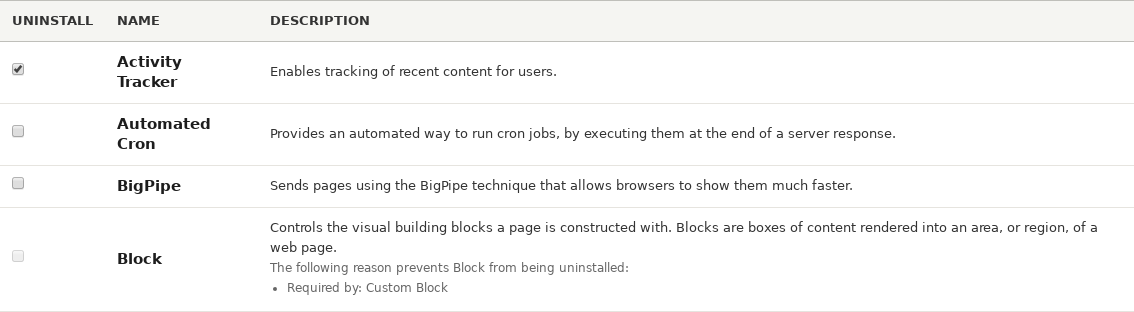
- In the Manage administrative menu, navigate to Extend > Uninstall (admin/modules/uninstall) where you will find the list of modules that are ready to be uninstalled.
Check the boxes for the modules you are uninstalling (Search, History, and Activity Tracker). Click Uninstall at the bottom of the page.
Nota
You cannot uninstall a module if it is required by some other module(s) and/or functionality. For example, the core File module is required by the core Text Editor, CKEditor, and Image modules. It can’t be uninstalled unless you uninstall its dependent module(s) and functionality first. A module that cannot be uninstalled yet will have a disabled checkbox, restricting you from uninstalling it.
Step 2 will prompt you to confirm the module uninstall request. Click Uninstall.

- In the Manage administrative menu, navigate to Extend (admin/modules). The Extend page appears showing all the available modules in your site.
- Find the machine name of the module you want to uninstall, by expanding the information area for the module. For instance, the core Activity Tracker module’s machine name is tracker.
Run the following Drush command to uninstall the module:
drush pm-uninstall tracker
- Seção 3.2, “Concept: Additional Tools”
- Seção 12.2, “Clearing the Cache”
- You can also uninstall the core Comment module by following these steps, but only after comment fields have been removed, which is a side effect of Seção 6.2, “Deleting a Content Type”.
Attributions
Written and edited by Surendra Mohan, and Jojy Alphonso at Red Crackle.
Source file: config-uninstall.asciidoc
Help improve this page
You can:
- Log in, click Edit, and edit this page
- Log in, click Discuss, update the Page status value, and suggest an improvement
- Log in and create a Documentation issue with your suggestion

