


This module provides the implementation for sending Firebase Push Notifications to devices with Node data as the payload. It depends on drupal/firebase that handles the Firebase API connections and simply builds upon it to offer the backend of subscribing/unsubscribing devices to specific topics as well as sending the notifications to those devices. The module currently supports sending notifications to topics or to a list of device tokens through a .csv file. Device token groups have not yet been implemented. I also provide a (not so great) frontend example in React Native on how you can make calls to this module and implement your frontend here: https://gitlab.com/tabs-and-spaces/fpn-for-nodes-react-native
The module also stores all the device tokens as well as all the topics they are subscribed to in a table in the database called 'gfpn4nodes'. That data is not used but could be useful if you have a way to map the device tokens to actual user data.
CONFIGURATION
-------------
This module will automatically pull the files for the drupal/firebase module as well as request to install that module when you try to install this one. You need to set the drupal/firebase settings first by following the instructions here:
https://www.drupal.org/project/firebase/ - TLDR; go to "/admin/config/system/firebase" and complete that form using your Firebase app information.
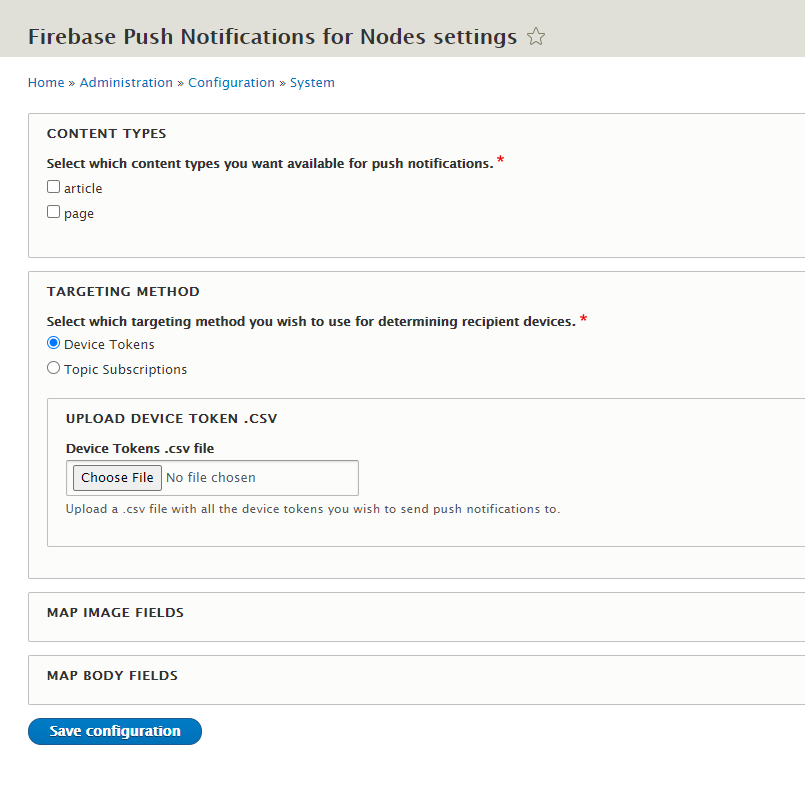
This module will offer a configuration form that can be accessed at "/admin/config/system/gfpn4nodes". Most of the field descriptions in that form are pretty
self explanatory but I will go through them nonetheless.
Content Types
This is where you select which Content Types will have their nodes available to be sent as a push notification. This adds an extra operation in the content view that appears only on nodes of the selected content types where you can click it to send the node data as the notification payload based on the mapping you do in the following fields.
Targeting Method
Firebase currently allows three ways of sending push notifications. Device tokens, topics and groups. Groups are not currently supported by this module. If you choose the device tokens method then you need to upload a .csv file that contains the device tokens you wish to send notifications to. If you choose topics then an extra field will pop up that will allow you to define which taxonomy term reference field from your various content types
maps to the topic to be used for the notification.
Map Topic Fields
This field will pop up when you choose to send notifications using topic subscriptions. It allows you to define which taxonomy term reference field represents your topic ID's.
Map Image Fields
This field allows you to map which image upload field represents the image that will be sent through the push notification.
Map Body Fields
This field allows you to map which textual field represents the body of the push notification.
INSTALLATION
------------
The Google Firebase Push Notifications For Nodes project installs like any other Drupal module There is extensive documentation on how to do this here:
https://www.drupal.org/docs/extending-drupal/installing-modules
But essentially:
1. a) The preferred way would be using composer by simply running "composer
require drupal/gfpn4nodes".
2. b) Or you could download the tarball and expand it into the modules/
directory in your Drupal 8/9 installation.
1. Within Drupal, enable the GFPN4Nodes module in Admin menu > Extend or use 'drush en gfpn4nodes'.
2. Enjoy sending push notifications using node data as the payload!
If you find a problem, incorrect comment, obsolete or improper code or such,
please search for an issue about it at http://drupal.org/project/issues/gfpn4nodes
If there isn't already an issue for it, please create a new one.
Thanks.
REQUIREMENTS
------------
Knowledge on Google Firebase.
The drupal/firebase module.
Basic knowledge on Drupal module installation/configuration.
MAINTAINERS
-----------
Current maintainers:
- Elias Papa - https://www.drupal.org/u/eliaspapa
Project information
- Project categories: E-commerce, Content display, Integrations
- Ecosystem: Firebase Push Notification (FCM)
 4 sites report using this module
- Created by eliaspapa on , updated
 Stable releases for this project are covered by the security advisory policy.
There are currently no supported stable releases.

