



This project is not covered by Drupal’s security advisory policy.
Label links to downloadable files with their file type and size
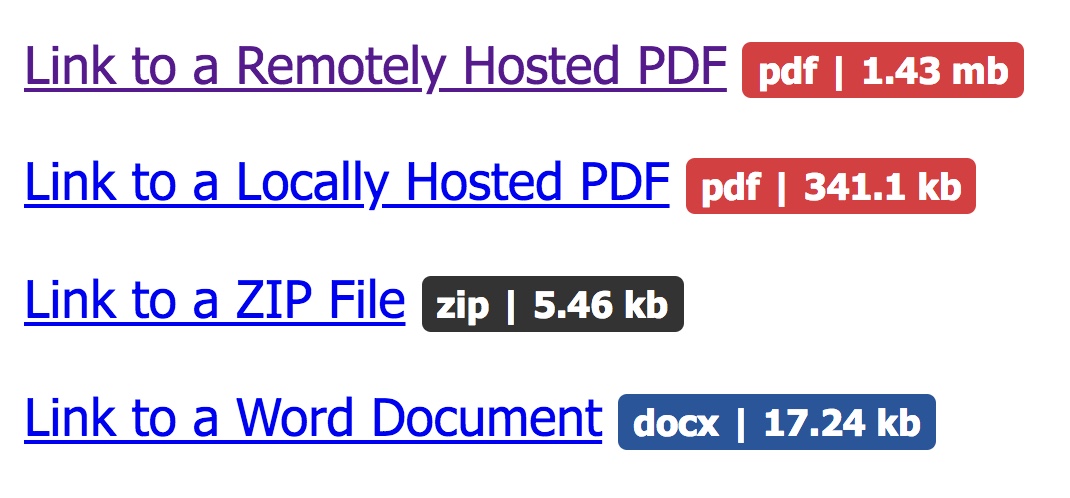
Download Link Labeler adds a text format filter that finds links to downloadable files in your content and adds a label after each one with the file's type and size, such as pdf 1.2 MB. Visitors know what they're about to download, and how large it is, before they click.
Many usability and accessibility guidelines, including those followed by US federal agencies, recommend showing this information next to links to files. The module adds it automatically, so editors don't have to type it or keep it up to date.
Features
- Automatic labels: links to files with an included extension get a label with the file type and a human-readable size, formatted in the content's language.
- Files on your site and elsewhere: the size of a file on your site is read from disk. The size of a file on another site comes from a quick
HEADrequest that waits at most 5 seconds. If the size can't be found, the label says "Unknown Size", and that result is cached for at most an hour so it corrects itself. - Accessible: screen readers announce the file type and size as part of the link, for example "Annual report (PDF file, 1.2 MB), link", including in their list of links. The screen reader text is translatable, and an automated axe test checks the labels on every release.
- Your choice of file types: PDF, Word, PowerPoint, Excel and ZIP files are included by default. Add or remove extensions in the filter's settings.
- No double labels: optionally, the filter replaces a file type and size that an editor typed after a link, such as
(PDF) (1.2 MB), with its own label. - Safe with any content: only files inside the Drupal root are sized, links that aren't downloads are left alone, and sites served from a subdirectory are supported.
- Themable: the label has the
link-labelandlabel-fileclasses, andlabel-file-<extension>for each file type (for example,label-file-pdf), with default colors for common file types.
Requirements
Drupal 10.3 or later, or Drupal 11. No modules outside of Drupal core.
Getting started
- Install the module:
composer require drupal/download_link_labeler - Go to Administration » Configuration » Content authoring » Text formats and editors, and edit a text format.
- Enable the Download Link Labeler filter.
- In the filter's settings, adjust the Included file type extensions, separated by spaces, such as
pdf docx xlsx. Turn on Replace labels typed after download links if your editors type file sizes after links themselves.
See the README for the label markup, caching, troubleshooting and the public API.
2.x Roadmap
- Caching remote file sizes and requesting them in parallel, for faster rendering of content with many external links.
- A configurable label text, such as
pdf | 1.2 MB, and a themable label template. - A Twig filter for labeling download links in templates, such as link fields.
Bug reports and feature requests are welcome in the issue queue.
Supporting organizations
Palladian Partners: Fully sponsored and supported the development of the Drupal 7 and Drupal 8 beta releases.
Project information
- Project categories: Content editing experience
 16 sites report using this module
- Created by matthand on , updated
 This project is not covered by the security advisory policy.
Use at your own risk! It may have publicly disclosed vulnerabilities.
Releases
First stable 2.x release: Drupal 10.3 and 11 support, labels that screen readers announce as part of the link, many link-handling and security fixes, and a settled public API.
Development version: 2.x-dev updated 26 Sep 2026 at 16:30 UTC


