

Closed (fixed)
Project:
Administration links access filter
Version:
8.x-1.0-alpha3
Component:
Code
Priority:
Normal
Category:
Bug report
Assigned:
Unassigned
Reporter:
Created:
14 Dec 2016 at 11:32 UTC
Updated:
18 Jan 2017 at 10:14 UTC
Jump to comment: Most recent, Most recent file


Comments
Comment #2
agoradesign commentedNo, that's not intended. If you have at least one option inside configuration or structure, the top level item should of course show up.
Could you please list all relevant permissions you've turned on (best thing: export the config of the user role's permissions and post here)
For the meantime, I propose to use alpha2 in the meantime. There are absolutely no database or configuration changes between alpha2 and alpha3, so switching back works seemlessly. alpha3 introduces some additional filtering, which worked great for me on a test environment with users only having single permissions. There may be some edge cases, which we haven't explred so far
Comment #3
jaymehls commentedThanks for the quick response. I have attached the configuration file for the role I am testing with. Let me know if you need anything else.
Kind Regards,
Jamie
Comment #4
agoradesign commentedHi Jamie,
this is really very strange. I've replaced my user's permissions with yours, which means that my user even has less permissions, because my test site does not have the same taxonomy and node bundles, no disqus module, etc
But nevertheless I'm seeing the "structure" top level item, having block layout, menu and taxonomy as children. As already mentioned, I've tested it successfully with far less permissions, e.g. only allowing taxonomy or menu administration.
So I'm tending to close this issue report. Or should I leave it open, until you've done debugging the code by yourself? So you could find out, on which place the items get removed?
Comment #5
jaymehls commentedThanks for having a look into this. That's very odd, maybe there is some other module I have installed which is conflicting. I'll do some more digging into the issue and see what I can find.
Comment #6
agoradesign commentedYes please, that would be really interesting...
Comment #7
jaymehls commentedHi,
So the issue seems to be coming from the fact that the ['below'] array is empty for both structure and configuration for me.
This is then triggering the admin_links_access_filter_is_overview_page() function
Upon debugging this function the controller variable is NULL for both menu and taxonomy.
The block structure page is returning "\Drupal\block\Controller\BlockListController::listing" as the controller but since this isn't in the $overview_page_controllers variable the function is just returning false.
Thanks,
Jamie
Comment #8
agoradesign commentedWhat you're describing, is actually intended and correct behaviour. And it seems, you're mixing some things up here. Let me explain in detail here, we hopefully get then nearer to what we expect and/or what is wrong:
If a parent item, e.g. structure, is empty (has no children), it should be hidden. That's desired. Why should you show the link then, if there's nothing to do on the overview page? So this is actually correctly working. The next question is, whether it should be empty or not.
The admin_links_access_filter_is_overview_page() is actually intended for parent items like "structure" and "config". These pages itself are only a list of links to specific child configuration pages, but do not have any own settings that you can change and save. So, if they are empty, they are useless and should be hidden. As you can't check this with a specific permission, we have added the admin_links_access_filter_is_overview_page() to actually check, if the page is a known controller which does such link listing only.
If you look into the code, you'll see, that if admin_links_access_filter_is_overview_page() returns FALSE, that item is actually not excluded at all. So, having no controller set or not matching its conditions means that the item is NOT hidden at all.
I'm wondering, if admin_links_access_filter_is_overview_page() ever gets called for menu, taxonomy and block admin routes. Because, if, they won't get hidden at all. Did you just try and called the function with that routes for debugging purposes or does this actually happen???
The block administration page for example, should be by checked against its page permission, and that is "administer blocks". So if a user has this permission and therefore is allowed to visit /admin/structure/block, then line 53 "if (!\Drupal::accessManager()->checkNamedRoute($route_name, $route_params)) {" should be called, whether or not remove that menu item.
This hasn't really changed since alpha2. And this should be the only point, where the mentioned links should get removed. You should check this.
If I'm right so far, now we should clarify, if something that gets removed there, is removed unjustifiably. I'd wonder that of course, be cause the checkNamedRoute() call should deliver the correct result. In other words, it should not be possible, that you are allowed to have access to e.g. /admin/structure/block, but don't have it in your admin menu.
Please, do some more investigation. If you experience this kind of problem (allowed to access the page, but not see the link), please verify, that the mentioned link gets kicked out in line 54 and not in line 69 of my module and tell me the path, where this happens
Comment #9
jaymehls commentedHi,
I completely agree with what was mentioned above "if there are no child links then the menu item shouldn't display" however it seems that drupal isn't showing any links in the below array even though they are definitely there.
There may be a permission I have missed so I am attaching a permissions file on a fresh drupal website without any extra extensions.
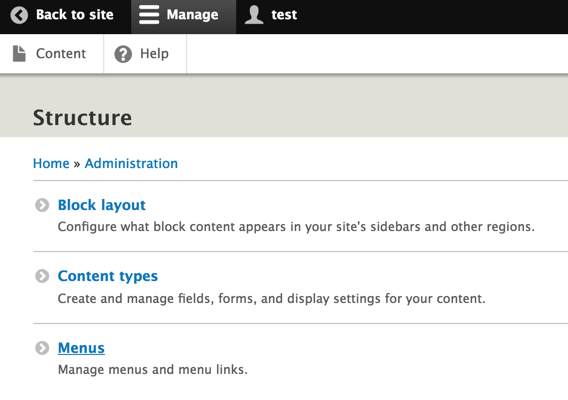
I have also added a debug line to the module at line 69. I have attached a print screen of the structure item being debugged which is therefore getting removed at that point.
I am getting the expected result back if I also comment out the whole if statement around the admin_links_access_filter_is_overview_page() function. But as you mentioned above we shouldn't even get to that section since there are links in the structure menu.
Comment #10
agoradesign commentedthank you for that detailed description!
I will try again to reproduce that on a clean test environment, as soon as I'll find time.
So that also means, that if you comment out that part, that you'll only find the parent "structure" item in the menu, but without the 3 children - is that right?
It would be very nice, if you can do one more check: could you please uninstall my module and have a look at the adminstration menu then? Are the 3 child items included in the admin menu or not? That would help in order to find out, if this module kicks out the items,or if they are never present at all. Both could be hard to find out why...
Hopefully we can find a solution that does a correct filtering. Otherwise I think, we should make that parent item filtering optional via configuration
Comment #11
jaymehls commentedYour very welcome glad I could help. Thanks very much.
If the section of code above gets commented out all of the expected items appear in the menu still.
Sure, so when I uninstall the module I get every site link showing the in the admin toolbar but a lot of them just go to access denied pages. Not really sure why this isn't part of core drupal function. Surely if the links aren't accessible, why show them in the first place.
Big thanks for doing this module though, removes all the stuff most users on the site don't need to see. :)
Comment #12
agoradesign commentedI now can reproduce your problem... I'm trying to investigate this now
Comment #14
agoradesign commentedThere was one thing, that I have overseen: I'm using the admin_toolbar module in every single D8 project, as far as I can remember since we started our first Drupal 8 project in autumn 2015. So this is kinda default core logic to me, although it isn't.
admin_toolbar does one very comfortable and for this issue very important thing: it adds a drop-down menu to the toolbar, in other words it loads and adds the child items to the administration menu. Without that, the top-level menu items will never have children, so the 'below' array key will always be empty. In this case, I really don't have a clue, how we can properly check, whether the overview pages are empty or not.
I was thinking about adding admin_toolbar as dependency of this module. But I'm against that because it does work without admin_toolbar. It still filters non accessible links of the overview pages in the admin area, for example. Without admin_toolbar it is just not possible to decide, if top level menu items pointing to admin overview pages are empty, leading to possibly having useless parent menu items then.
I decided to add a soft dependency on admin_toolbar instead. I'm checking for the existence of admin_toolbar in the code before filtering admin overview links, otherwise I won't do that filtering at all. Further I'm adding "suggest" entry to the composer.json, recommending the usage of admin_toolbar module, as well as I will update the module's description to and add a recommendation there too.
Comment #15
jaymehls commentedGreat, thank you so much for your help with this. Keep up with the good work on this module, been a lifesaver for me.
Kind Regards,
Jamie