Issue Summary
- #46 Describes the problem as to why the issue is happening which generally narrows down to hard coding of html ids for modal opening and closing command.
- #48 Provides a solution so that each open and close command can work with separate modal ids, It also provides a solution for media library form.
- #73 Extracts the open and close command modifications from #48 so that it can be merged with core first and then for each individual case a separate issue and patch can be added.
Proposed resolution
- Review and merge #73 or #48 in core.
- Create individual issues for each possible use case like media library, Ckeditor etc.
- Add the change records.
- Manage nested modals of the same type, like opening one media library within another.
Original Post
I am currently looking into running CKEditor in a modal dialog using the Drupal Modal API.
At this moment it is working OK, but there is a problem with the link and image modals which can be triggered from the CKEditor interface. Those also use the Modal API and when triggering one of these functions, the modal containing CKEditor is fully closed.
Is there any way to open de link/image modal without closing the CKEditor modal? It seems like it is possible to define the HTML element to which the modal should append when triggering. When overriding this setting ('appendTo' => '#foo'), even the link/image modals are appended to #foo (instead of the default '#drupal-modal').
Any ideas on how to get this to work?
Thanks for your support.


 Show commands
 compare





Comments
Comment #2
wim leersThis is really about nesting of modal dialogs. I'd swear there is an issue for this, but I can't find it.
Comment #3
droplet commentedhmm....It seems we can improve it by changing CKEditor dialog to a unique ID. Any thoughts @WimLeers / maintainers?
https://github.com/drupal/drupal/blob/8.2.x/core/misc/dialog/dialog.ajax...
Comment #4
wim leersThis is a generic problem. What if something triggers a modal while already within a modal? That should work. This is not at all CKEditor-specific.
Comment #5
vollepeer commentedIndeed, same goes for the link modal.
Comment #6
wim leers@vollepeer: can you explain that a bit?
Comment #7
wim leersOh, now I found that issue I was looking for in #2 — turns out @vollepeer was the one who opened it! It's #2737319: Opening a modal from inside another modal (nested modals), I marked it as a duplicate of this issue.
Comment #8
vollepeer commentedSorry about the duplicate issue Wim :-)
Ignore my comment about link dialog: it is also in the context of CKEditor (image dialog + link dialog).
Indeed it relates to modals in general. However, like Droplet mentions, the modals triggered using the Drupal 8 Modal API seem to all be using the same parent HTML element. That wouldn't be an issue if new modals were attached to the element. But it seems like before opening a new modal, existing modals (if any) are cleared/destroyed.
Comment #9
wim leersHah, no worries :) Can be confusing/overwhelming to find your way through the Drupal core issue queue :) Hopefully my triaging helps.
Comment #11
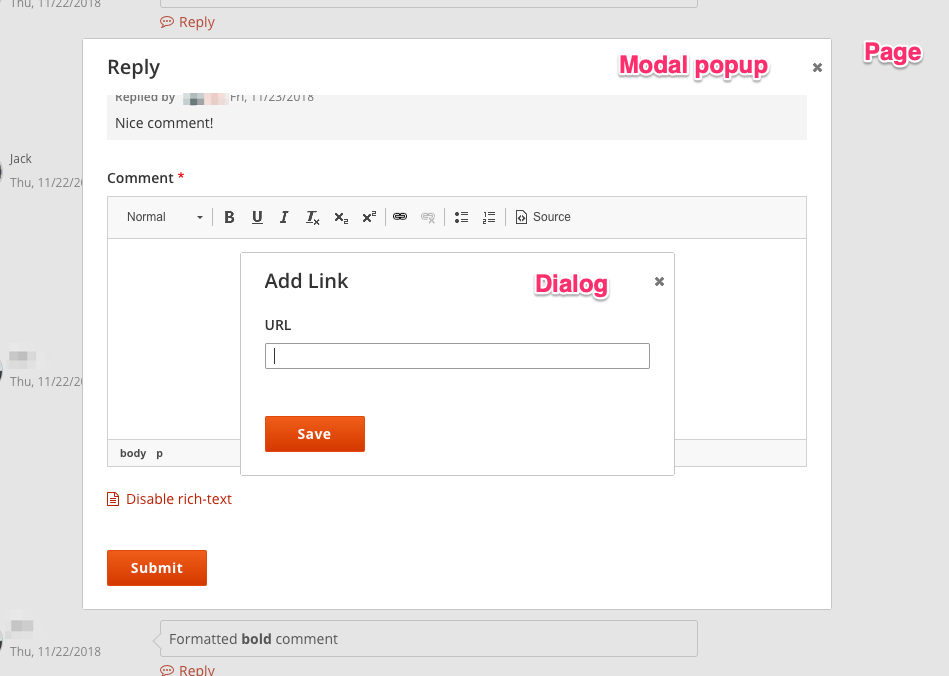
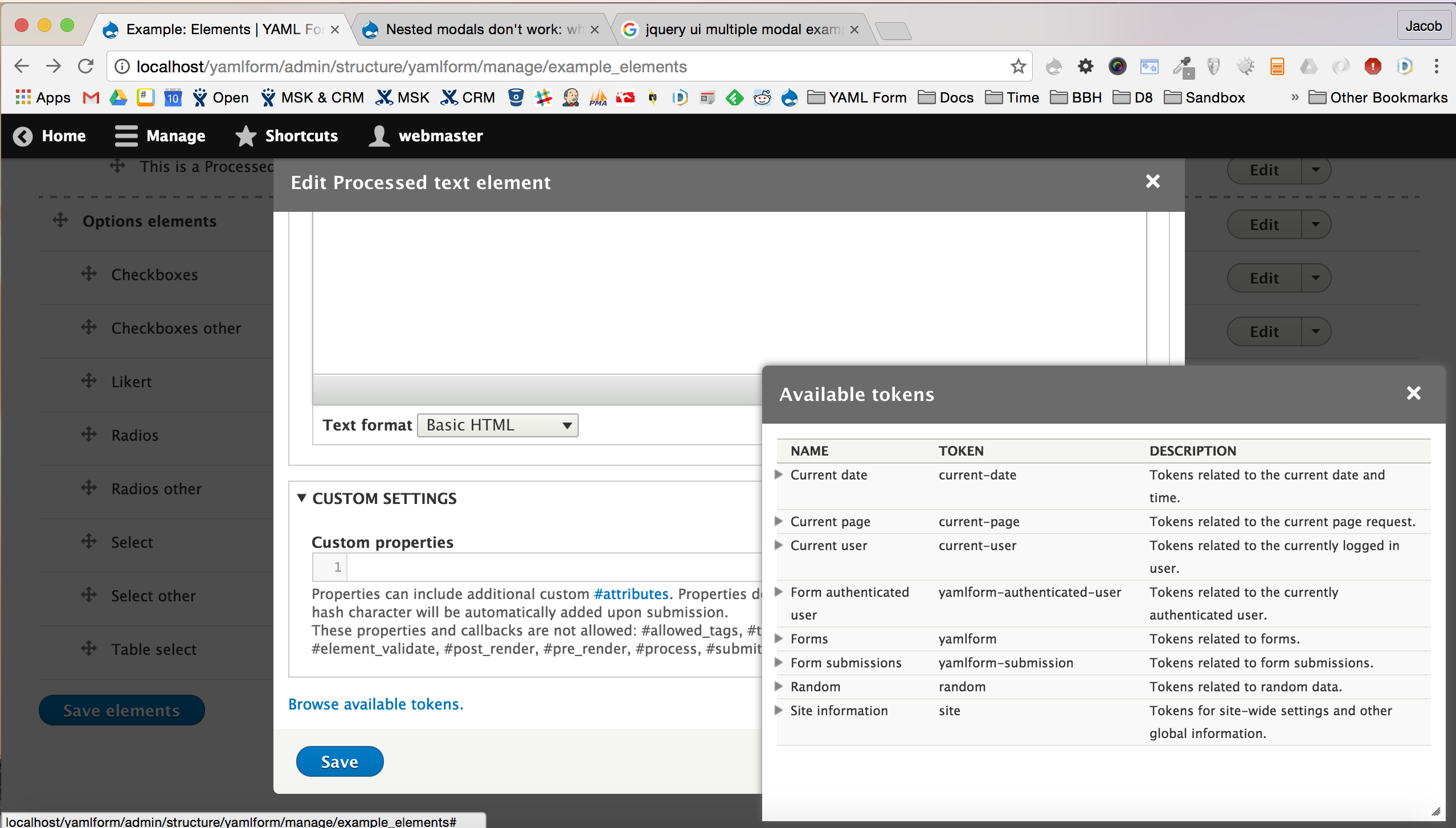
jrockowitz commentedI have ran into this issue with the YAML Form module's UI where I am relying on modals.
Below is an animated GIF documenting my issue.
It is worth noting that the Token module's dialog does not replace the YAML Form module's dialog because the Token module is opening a dialog and not a modal.
Comment #12
droplet commentedConsidered the BC, I thought it should be opt-in (to open another Modal) than opt-out (close old instance).
Instance A:
In general, by design. If I make a module and expected anything working inside a Modal. I will set a unique ID for the dialog (It's already supported in CORE, like the Token does)
Instance B:
In another case, take the CKEditor as example, I'd thought:
B1. If we designed the CKEditor buttons Modal always pop up to TOP layer and hidden all other elements. Then, other modules should listen to its callback and restore the old windows.
B2. If we designed the CKEditor buttons worked inside Modal BY DEFAULT, then we should create a unique ID for the CKEditor buttons dialog.
Personally, with CKEditor example, I preferred B2. Just like what the Token does in above screenshot.
Instance A & B have no conflicts, it can be done at same time.
Let me know if I'm missing some important points. :)
Comment #13
Anonymous (not verified) commentedComment #15
Anonymous (not verified) commentedDamn, I just found this issue myself http://drupal.stackexchange.com/questions/226980/image-upload-replaced-m...
Can't we use dialog instead of modal for the image?
Comment #16
Cauliflower commentedThis issue is also related to this one: #2836043 (https://www.drupal.org/node/2836043)
Comment #17
Anonymous (not verified) commentedAaah, this goes for links as well. Like 50% of the buttons are unusable like this. If there would be modal form in the core that would use any of these it would be a major bug. Unfortunately it is not :(
Comment #18
droplet commentedTagging 2 tags to see what their thoughts on these usages. (also on Comment #12)
"Single Modal all-time" vs "Nested Modal" vs "BOTH"
Comment #19
andy_w commentedIn the event that you need to go against the drupal defined method of a single modal window - which in turn prevents the use of nested modal window - you could use the OpenDialogCommand rather than OpenModalDialogCommand with the modal option set to true. This would allow you to use nested modals in the context of a built module.
Comment #20
wim leersThis is really more of a feature request than anything else. Using nested modals is a bad practice.
Comment #23
dsnopekDo dialogs in the Views UI count?
See #2900594: CKEditor not available for Views "text" areas
Comment #24
tibezh commentedHi All!
I had same issue.
For calling a modal window we should add a "data-dialog-type" attribute. This attribute accepts the values "modal" or "dialog".
I had the "modal" value.
After changing the value to "dialog" the modals from CKEditor it seems work
Comment #26
mikhailkrainiuk commentedHello!
@tibezh nice idea! :)
I had the same issue. I open popup (modal dialog) and when I click by "link" button, I see just one popup with link settings.
I updated ckeditor module and it works for me - see the screenshot. It shows popup over popup.
I created the patch to fix it. Verify it, please.
Thank you!
Comment #27
mikhailkrainiuk commentedHmm... Sorry, there are errors already. When I click by "Save" on link popup, it closes parent modal.
On my local project I fixed it: I set "dialog" type for my modal and "modal" type for ckeditor, it works correctly.
But it is a custom solution.
Comment #29
dabbor commentedI needed to solve this problem as this is blocking having any configurable modal form with fields as any configurable modal form can contain wysiwyg (with ckeditor and thus nested modals in form of image/link modal).
The working nested modal windows idea for my workaround:
Even though each dialog window has its own specific id (using hash to be certain about it), the #drupal-modal id is being used as the main identifier (like a shortcut to make the logic/implementation easier). Opening and closing modal dialog is done through jQuery dialog plugin and the id specific to each dialog window is being used.
To support nested modal dialogs we just need to create dialog ids stack and change the #drupal-modal id to something else when getting one level higher and returning it back when moving down. Disabling the lower level dialogs is also required so that user can’t interact with them while working with the active one (the top one).
Additionally I had to create "BeforeOpenDialogCommand" (an AJAX command) that and alter AJAX responses to send it before "OpenDialogCommand". This way I was able to modify modal ids and z-index (to disable it) before new modal dialog was open. Including creating a new placeholder for modal window by:
Later on using
$(window).on('dialog:afterclose', function (e, dialog, $element) {...}to remove that placeholder and set the previous modal id and z-index back.I would vote for having somethng like that in core. It might be not the best practise to use nested modals, mostly going more then two levels, but forbidding it by not implementing generic solution for modals, while there's no technical obsticle, seems bad practise to me.
Comment #31
dercheffestumbled over this issue because I run into the same problem. bump this issue :)
Comment #32
johnwebdev commentedThe Layout Builder Modal module had a similar issue, and what we did was that we use the dialog type dialog instead of modal, and then having the option modal as true for the dialog rendering the CKEditor.
I noticed that the suggestion has already been commented earlier, would that option work for you @dercheffe?
Comment #33
dercheffeHi @Johndevman,
thanks for your reply.
I tried the patch provided in #26 and the proposed solution (I guess you mean this solution?) in general it's working fine. but I experienced the same errors/behaviours mentioned in #27.
Comment #34
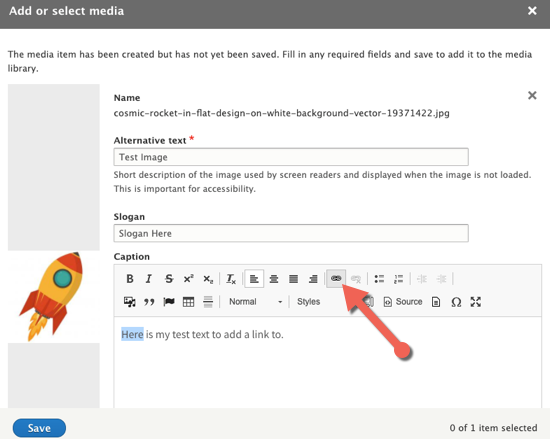
tobiberlinHey... the same issue appears in Media Library when Media entities have a text field with CKEditor enabled:
- media entity "image" has a text field "copyright", where a CKEditor is used with a link button
- a node entity has a media field referencing media entities of type image, the form widget is Media Library
- when I upload a new image in the Media Library I can edit the image fields within the modal of the Media Library. Here I see my copyright field. When I click on it the whole modal is filled by the fields for link plugin. When I fill in the fields and click "Save" nothing happens
Comment #35
tobiberlinJust to add another finding: when I use the Table plugin of CKEditor within a textfield the problem does not appear. The Table plugin seems to use the "cke_dialog". So it opens another modal ("cke_dialog") over the modal where CKEditor field is rendered in ("ui-dialog").
Comment #36
tobiberlinI am not able to go in deeper by now but I want to share my findings so far:
Maybe someone else with more JavaScript skills may have a look on this. It seems to me that best solution is to refactor Drupal.ckeditor.openDialog in a way that might be similar to CKEDITOR.dialog.add?
Comment #37
xjmComment #38
mrzapp commentedFor anyone stumbling across this thread wanting a terrible hack that work right now, you can use this:
Comment #39
dpiI think we agreed earlier in this issue that the issue isnt specific to CKeditor
Comment #40
nuezCurrent situation
Every CloseModalDialogCommandmakes all HTML elements with #drupal-modal disappear. So if two subsequent modals have been opened, both having
#drupal-modal(which is not correct HTML), then both will get closed upon CloseModalDialogCommand.parent::__construct('#drupal-modal', $title, $content, $dialog_options, $settings);the ID is hardcoded.My proposal
Afterthoughts
Whether or not this is bad practice can be debated (I think that depends entirely on the use case.)
Independently, I would still qualify this issue as a bug since Drupal Core allows any url to be opened in a dialog by adding
class="use-ajax" data-dialog-type="modal"to any link, including, say, links to node forms. On the other hand core opens modals from ckeditor (image) and in widgets (media library). So a modal in a modal is very much core functionality IMHO.I'm marking this as a bug again, but feel free to put it back to 'task'.
Comment #42
nuezThis is - perhaps not unexpectedly - a lot more complex than it looks.
My idea was to add some sort of 'context' to the ID of the modal, but this context is not consistently available to be able to use it.
I'm uploading a new patch that uses the State System to assign and check for a random ID string to each modal. This is probably far from ideal, but I hope it's the start of a solution. I also have not looked into the JS side of things.
New patch includes tests for:
I'm adding a test-only patch to prove that things are currently not working and are working with the proposed solution (I hope).
Tests that were previously breaking are now working. Curious to see if the testbot has any other complaints.
Comment #43
nuezComment #46
nuezOK, so:
E.g. If the views UI were itself to be shown inside a parent modal, then all interaction would break because subsequent modals would delete the parent modal.
It's well beyond my level of understanding how we should make ModalRenderer aware of the scope of the modal: For now I've added a render array property called '#modal_selector', which can be used to pass the scope of modal, which should probably be declared somewhere. Maybe even required with a @trigger_error.
Questions?
Looking forward to hear any feedback
Comment #48
nuezWith a bug, all tests should pass now. 2741877-46-48.patch is the interdiff.
Comment #49
johnwebdev commentedThanks for working on this nuez!
Is this a new default template variable? This would need some documentation.
How would I set this scope selector when using data- attributes? i.e
Comment #50
nuezThis definitely needs documentation. I see #modal_selector as a render array property like #cache, which would possibly be required the Modal Renderer. However, even if 'scoping' the modals is the right approach, there are probably still dozens of different solutions to this. I think the maintainers of the different subsystems involved need to say something about this from here.
Maybe the scope doesn't have to be set in data attributes, modals created with the data attributes might get their own scope internally.
Comment #51
johnwebdev commentedAs long as it's predictable I think that could work as well!
Comment #52
danielvezaAmazing work. I just came across this issue today when using Linkit and Media Library together, and this patch solves that issue + tests pass. Really nice!
I just left a couple of tiny comments. Neither of them are blockers or anything that should break, just clarity changes. Happy for them both to be ignored if people disagree.
This will also need a change record I assume.
I'll leave this at needs review for now. But functionality wise this is RTBC from me.
Tiny nitpick - Can we take the ternery out of the function call?
Happy to be overridden on that. I'm just not a fan of logic in function calls personally.
Even though we can see the doc comment I think it could be valuable to add an inline comment here.
Comment #53
heiket commentedtested @DanielVeza patch with Linkit and Media Library. Working well! +1 Ta!
Comment #54
BinaryBlock@nuez ... Thank you for the patch! @DanielVeza thank you for testing it!
I have been following this issue for a while now and trying to code something myself without any real luck.
I am experiencing a problem with the patch though. I am running Drupal 8 v8.8.4 with your patch.
Here are the steps to reproduce my problem:
I am able to re-open the "Insert from Media Library" and re-selected the added media... then if I click "Insert Selected" it puts it into the CKEditor properly.

Somehow it seems that the first modal/dialog is losing its callback ability. Maybe something with scope... not sure. If we're able to get this functionality back with this patch it will solve everything we're trying to do with our team!
Thank you in advance for any help or advice you can provide.
Comment #55
danielvezaTiny thing. @nuez made the patch and deserves all the kudos. I just reviewed it :D.
I'll have a look at that issue when I get some time. I don't think I was seeing that happen but I'll double check.
Comment #56
thetaPCPatch #48 works, but I get the following errors when using Drupal core v. 8.8.4 Media Library and Focal Point v. 8.x-1.2:
Warning: unlink(/Users/*/Desktop/sites/*/sites/default/files/styles/*/public/2020-04/*.jpg): No such file or directory in Drupal\Core\File\FileSystem->unlink() (line 124 of /Users/*/Desktop/sites/*/core/lib/Drupal/Core/File/FileSystem.php)
Failed to unlink file 'public://styles/*/public/2020-04/*.jpg'.
Comment #58
r_h-l commentedUsing Focal Point 1.4 with the latest Media Library patch (https://www.drupal.org/project/focal_point/issues/3094478), this works almost perfectly. The only oddity is that the AJAX generates additional '0 of 1 item selected' messages when previewing. Screenshot attached.
Comment #59
thetaPCI'm also getting the weird message in Media Library as @R_H-L.
Comment #60
BinaryBlock@DanielVeza and @nuez Obviously a lot has been happening in our lives and around the world as a whole.
I just wanted to see if either of you has been able to review the issues that have come forth and any ideas of how to resolve them?
My specific issue is outlined here: https://www.drupal.org/project/drupal/issues/2741877#comment-13577182
Thank you in advance and I totally understand if your attention has been needed elsewhere.
Comment #61
nuez@BinaryBlock Thanks for your feedback. I can actually reproduce your error and it definitely needs to be addressed in this issue:
Maybe you can write a test to prove that this use case hasn't been solved in the patch of #48?
I also think that, even though we need to address this particular case described in #54, it's equally important that we get some reviews/guidance from a core maintainer or contributor to see if this is the right approach in the first place.
Comment #62
danielvezaAnother thing this patch currently doesn't fix is Models with the same scope. This is an Edge case where we have a site that has a Thumbnail (Media library) field on a Remote Video Media Entity.
So:
Comment #63
rajab natshahThank you

patch #48 is working
Comment #65
tanubansal commentedTested #48 on 9.1, its working fine
This can be moved to RTBC
Comment #66
jastraat commentedRerolled #48 for 9.2.x
Comment #67
jastraat commentedSorry - corrected without the offsets from originally applying #48
Comment #70
raman.b commentedComment #71
danielvezaHas #62 been tested with this patch?
Comment #72
rar9 commentedwhat patch to use with D9.0.8 with webform 6 alpha? #70 is not helping.
Comment #73
timodwhit commentedThanks for the work @nuez.
Without bike shedding too much and as posted in #40, there are two issues at hand:
1) Core allowing nested modals
2) Places where modals break (ckeditor, media, etc)
Looking at the patch to allow the selector to specified, from the Close/Open Dialog this should be a quick patch that removes the hard coded reference. This is strictly copy and paste from @nuez' patch.
Once that patch is in, we could track the more complex interactions and bugs (media) have more comprehensive tests and issues that track other usability issues, where it needs to be enhanced, etc.
NOTE: the patch will not fix the media issues and will not solve the issues, it will just allow those issues to be solved future patches on separate items.
@wim @xjm, thoughts? This feels like an issue that will suffer a death by paper cuts if not segmented and focused.
Comment #74
markus_petrux commented+1 for #73 approach, as this will also allow to resolve issues in custom code.
Comment #75
jastraat commentedAdding a Media Initiative tag.
Comment #76
daveianoI got the same issue as described in #62
I have a media library field attached to a media entity (Media Type "File" has a field for a "Preview Image"). So if I want to set the file with media library, it opens the modal and I can upload a file. If I want to set the preview image, I am getting an ajax error:
Drupal\Core\Form\FormAjaxException: in Drupal\Core\Form\FormBuilder->buildForm() (Line 340 in /web/core/lib/Drupal/Core/Form/FormBuilder.php).Comment #77
kapilv commentedHear a reroll patch.
Comment #78
nick hope commented#77 applied fine for me to the current 9.2.x-dev but there is still a problem when using with CKEditor and adding links. These were my test steps, which are similar to #54:
1. Set up embedding media with CKEditor.
2. Enable a 'Text (formatted)' field on the Media library form mode of Image Media type.
3. Create Basic page and switch to a Text format that has the "Insert from Media Library" on the CKEditor toolbar.
4. Click 'Insert from media library' button.
5. Browse...
6. Select image.
7. Add required Alternative text.
8. 'Save and select'. Image appears in media library, pre-selected. (unlike the problem in #54)
9. 'Insert selected'. Image appears embedded in CKEditor.
10. Repeat for another new image but this time insert a link in the 'text (formatted)' field using the CKEditor link button (I tried 'https://www.drupal.org' and a couple of other links).
11. When I click "Save" nothing happens. The dialog remains on screen.
12. When I dismiss the dialog by clicking "X" it returns directly to the 'Create Basic page' page and the media item did not get added.
Adding links still works correctly when adding image media directly at /media/add/image.
This is a very new test site with little added. No Editor Advanced Link or Linkit installed.
While I'm here I'll link this issue with the Entity Reference Tree Widget that I'm hoping might get resolved by a fix for this issue. #77 unfortunately does not help that case either.
Comment #79
nick hope commentedPatch #70 does not allow new media to be inserted by either "Save and select" > "Insert selected" or by "Save and insert". But it does accept a link before that failure, and that link is remembered.
Comment #81
vakulrai commented@Nick Hope , looks like the problem is with the plugins refocusing to the editor if text or entity is left unselected. I have added a solution for the link plugin, it is working for the scenario you mentioned.
Please review.
Comment #82
gauravvvv commentedRe-rolled patch #82, Please review.
Comment #83
nick hope commentedThanks. I tried patches #81 and #82 in both Drupal 9.1.8 and 9.3.0-dev. Unfortunately in all cases the problem I described in #78 still remains. They also don't help the case of an Entity Reference Tree widget (modal) launched from a Hierarchy Manager modal (which is the issue that brought me here).
Comment #84
carlitus commentedTested #77 and #82 with Drupal 9.2, with a modal node form using class ajax and data-dialog-type="modal". In this node i have a media field with media library widget.
It doesn't work, just after i select the media it closes the current modal (the media modal) and nothing more happens.
Comment #85
briantes commentedTested latest patch on Drupal 9.2.1, It doesn't work. If you add a ckeditor field in a custom modal form, and open this form, when you clic on url button or image button, the form is fully closed. I have tested the other patchs, but none works.
Comment #86
timodwhit commentedI'd like to try and reiterate my point in #73. There are complexities tied with the approaches in testing vs the simple ability to add an id for the open action.
Is it okay to separate the tasks and the areas of concerns?
Comment #88
randalv commentedBumping this issue again.
Is there any further development on this? I still cannot launch a link modal from a ckeditor wysiwyg inside a modal, my use case:
- List of media references
- Click the 'pencil'-icon, this opens up the media edit form in a modal
- Attempt to add a link in the custom description field (with basic html or something on)
- The initial modal closes, and the other modal is unable to add the link to anything since the ckeditor field is gone.
I've tried the latest patches, and these sadly do not change this as @Nick Hope mentioned.
Comment #89
ajv009 commentedCould this be in priority? Because I see this as a major bug!
Comment #90
larowlan@AJV009 can you expand on why you feel this is major
Per the issue priorities
Does this fall into one of those categories? If so can you update the issue summary to expand on the impact.
Thanks!
Comment #91
ajv009 commentedRe-rolled "2741877-48.patch" patch from https://www.drupal.org/project/drupal/issues/2741877#comment-13563283 #48 from this thread.
Tested and worked on Drupal 9.3.9
I clearly understand we have shifted our focus to a more reliable solution, but until that happens we need to have something.
My patch might look a bit fuzzy, because I re-rolled it in just few seconds I was SUPER late for something when I was re-rolling the patch on a DrupalPod instance!
Thanks @nuez
And yes @larowlan, I might be able to assume that the problem falls under one of these
- Render one feature unusable with no workaround.
- Cause user input to be lost, but do not delete or corrupt existing data.
We have a pretty simple code that adds ['use-ajax'] and 'data-dialog-type' => ['modal'] to certain contextual links.
Everything works fine until I open another modal such as a media entity edit dialog box, when it opens the previous modal closes automatically weird right? therefore when I click on insert in the media library dialog box it closes as expected BUT the data which I inserted just vanishes, I couldn't see the previous window through which we opened this media library dialog box. MAGIC!LOST!
This causes the use-ajax feature unusable when used with media library modal.
Not just use-ajax being unusable but the data which I uploaded goes missing as well.
I made my last comment before I thought of reapplying neuz #48 patch.
So sorry about changing that the priority without thinking much.
Reverting the change since we have a workaround for now.
Comment #92
ajv009 commentedSince we have a workaround now maybe it can go to Normal.
I am really sorry about causing the mess here.
Comment #93
larowlanHey @AJV009 no mess at all. If there's user input lost, then it is definitely major
Comment #94
guptahemant commentedUpdated the summary.
Comment #96
no sssweat commented#91 patch not working for me when editing a media image, which opens modal. Then trying to add link (via ckeditor) to the image caption field, which opens the ckeditor's url modal. This closes the media modal and clicking save on the url doesn't do anything. Same issue #88 said.
Comment #98
tobiberlinI want to bump this again. Same issue as described in the last comments (and described by me three years ago)
I really have no clue if this is an issue for the Media or CKEditor / Text Editor module.
Comment #99
tlo405 commentedI'm still seeing an issue here regarding modals and ckeditor5. I've already mentioned this here but I figured it wouldn't hurt to add it here as well.
In ckeditor4 I have a custom plugin that inserts some html onto the page. When clicking the icon on the ckeditor toolbar, a modal pops up with a form. The values of those form fields end up being inserted into the html as attributes. One of those fields is a media field that opens up another modal in an entity browser. I am able to make a selection from that modal, and then submit the original form in the first modal with no issues. The html gets inserted right into the editor.
However, in ckeditor5, this functionality breaks. If I don't click the 'select media' button to open up that 2nd modal, the html gets inserted correctly when I submit the original form. However I can't get any html to appear in the editor once I click the 'select media' button and that 2nd modal opens. Even if I close the entity browser modal without making a selection, it still won't insert any html into the editor when I submit the original form. I see no errors in the console either. I've applied the patches above but no luck.
Comment #100
alphex commentedI can confirm patch 91 doesn't work.
This is on Drupal 9.5.5, but... hoping the patch carries backwards.
I have a media entity which takes vimeo URLs.
But the project needs to upload their own custom placeholder image, but we want to use media for that.
So media library opens a modal for the VIDEO entity type, then clicking the add media button for the place holder image, opens the 2nd modal.
Selecting the image sends you back to the node edit screen ... and, you lose the other work you did to build the video entity.
Comment #101
gauravvvv commentedUpdating attributions
Comment #102
fabsgugu commentedHello,
I noticed a bug like this, so I don't know if it's related to this issue or not, but when I have a field media in a Node that has a media field itself, when I try to add a media in the modale I have a 500 error in the logs.
To reproduce:
- Have activated the modules: Node, Media and Media Library (No Contrib module is involved, I reproduced this Bug on an instance without, I even deactivated CKeditor.)
- Create Media with a media field (and put media library in the formatter form)
- Create a Node which is linked to the media field created (and put media library in the formatter form and also put the field in the formatter of media library)
- Add a content of this Node then add a media on the media field, which allows to open the modal
- Once the modal is open, add media via the upload form, which then allows you to arrive on the modification page
- Click on add media
- Nothing is happening
I have warnings in logs :
Warning: count(): Parameter must be an array or an object that implements Countable in Drupal\media_library\Form\FileUploadForm->validateUploadElement() (line 211 of /var/lib/tugboat/stm/web/core/modules/media_library/src/Form/FileUploadForm.php)
Notice: Undefined index: fids in Drupal\media_library\Form\FileUploadForm->validateUploadElement() (line 211 of /var/lib/tugboat/stm/web/core/modules/media_library/src/Form/FileUploadForm.php)
And i have an error in the console (which I also have in the logs) :
Comment #104
bkosborneRan into this today and tested the workaround patch in #91. My test case is a media library widget, where the user uploads a new image media entity. The image entity bundle has a CKEditor-enabled text field. Before the patch, clicking the Link button in the CKE dialog closes the Media Library widget prematurely. After the patch, the link dialog opens on top of it as it should. However, it seems to cause other issues. After closing the link dialog and saving the entity, the "Save and Select" button doesn't close the Media Library dialog anymore.
Comment #105
r_h-l commentedWith the widespread adoption of the HTML
dialogelement, this should become more a matter of modernizing modals. This element supports chaining dialogs, styling, form awareness, good accessibility, and a host of other benefits.Simple example:
Edit, looks lik ethere is already an issue for this: Issue #2158943
Comment #106
arnaud-brugnon commented#91 can't be apply on 10.1.
Here's the new version
Comment #107
larowlanReroll of #91 as reroll at #106 was reporting as a corrupt patch file using
git applyComment #108
larowlanD10.0 version for those who need it
Comment #109
larowlanMore work here to support multiple editor dialogs, the saveCallback was previously only a single function but needs to be a Map keyed by the dialog selector
Comment #110
nuezComment #111
larowlanFixed linting issues and regression with the 'Save and insert' button in media library (argument order mismatch)
Comment #112
smustgrave commentedCC Failure.
Also can the proposed solution be updated to include what path was taken.
Comment #113
_utsavsharma commentedRerolled the patch for 11.x as the patch was not getting applied.
Please review.
Comment #114
a.dmitriiev commentedUploading patch for 10.1.2 in case someone needs to use the fix for stable version. The change from 11.x patch for this file
core/misc/dialog/dialog.jsdidn't work, because it has already more changes.Comment #115
a.dmitriiev commentedThe previous patch had a typo
core/modules/media_library/src/MediaLibraryEditorOpener.php:double
$$. This is fixed in the new one. This patch is only to use in the project, there is no need to review it or test it.Comment #116
rar9 commented2741877-10.1.5-115.patch not working with D10.1.16
Comment #117
a.dmitriiev commentedRe-rolling the patch for 10.1.6
Comment #118
_utsavsharma commentedTried to fix failures in #118.
Comment #119
pcambraI think the re-rolls from #113 onward are not really working, here are a Drupal 10.1 patch and a Drupal 11 patch that are functional.
Comment #120
pcambraComment #121
_utsavsharma commentedFixed failures in #119.
Comment #122
smustgrave commentedStill needs an issue summary update before reviews.
Comment #123
norman.lolReroll for 10.2
Comment #124
norman.lolHiding patch, it's the same as in #2741877-121: Nested modals don't work: opening a modal from a modal closes the original.
I should have checked first. 😭
Comment #125
dinazaur commentedFixed a bug that was caused by
dialogSettings.optionsproperty. It led to unexpected behavior on modals. Sometimes they missed actions, not opened at all.Comment #126
nuezThe reroll from #123 seems to be missing a few things. Embedding media doesn't seem to work with this reroll.
I've literally rerolled the d10 patch from #119 and there are a few differences.
Comment #130
mithun sResolved the Linting issue appearing on MR.
Comment #131
darren ohComment #132
deepaksingh05 commentedI'm facing the issue only when trying to update the content that has two nested modals to work.
When I update the media the parent modal gets closed. And this happens only when I try to update the media there is no issue when I create new content or media.
Facing this error after applying the patch at #126, I have tried almost every patch mentioned here.
I tried on ckeditor4 and as well as on ckeditor5. I'm using Drupal 10.2.6, I'm using entity_embed to upload the media.
Comment #133
daniel korteNoting here that I’m seeing a JS console error in D10.2.6 (with either patch #126 or the merge request since they are virtually the same) when attempting to embed media in ckeditor5 using a newly uploaded image and clicking the "Save and insert" button with the Media Library advanced UI enabled:
Comment #134
rajab natshahAttached a static patch file from the Drupal Core 2024-06-20 MR 8105
witch applies to both Drupal 10.3.x and 11.0.x branches
To be used with composer patches
Comment #135
carolpettirossi commentedPatch #134 worked perfectly on Drupal 10.3.0. Thanks for the re-roll Rajab.
Comment #137
andre.bononAttaching a patch file from the MR 8779 which applies to Drupal 10.2.x. (tested on 10.2.7) , to be used with composer patches.
It fixes an Ajax error from happening with the Layout builder modal and Drupal-off-canvas that wasn't fixed by the #126.
The Ajax error was preventing the LB modal from closing.
Comment #139
renanmfd commentedPatch #137 for Drupal 10.3.x
Comment #140
renanmfd commentedPatch #137 for Drupal 10.3.x with:
Comment #141
renanmfd commentedComment #142
renanmfd commentedSorry, #140 patch was bad.
Patch #137 for Drupal 10.3.x with:
025fb5d2 - Ensure dialogSettings variable is a object for dialog:afterclose event listener
Comment #143
luksakThe patch works in some cases, but I have the same issues as described in #132
Comment #144
anaconda777 commentedNone of the patches works for me:
What works:
Without this or any patch, When editing a node which is in modal and then opening a nother modal over it ( media entity browser for uploading media) works so that a modal opens over another modal and it can be closed without closing the parent.
So nested modals are working with media entity browser and node.
What does not work:
When editing a node which is in modal, then another modal opened from ckeditor5 (AI ckeditor5 integration) causes a problem = closing that modal will close all modals. (Uncaught TypeError: dialogSettings is undefined)
Also tried with patch #142 and #134 and they do not fix this issue
Comment #145
oways23 commentedRe-roll patch 142
Comment #146
mutasim al-shoura commentedWe have another important case that needs to be addressed in this issue. The case involves using a media library widget within a media library widget. When we open a media library from another media library, it replaces the previous one and closes both upon submitting the child media library. For example, in the remote video media form, we added a cover image field with a media library widget. When we click to add media for the cover image, the new media library will replace the old one and will now submit or save or add the remote video or the cover image.
Comment #147
rajab natshahFacing an issue with AI CKEditor 5 integration as well when using this MR/Patch.
Comment #149
rajab natshahAttached a static
drupal-core--2025-02-06--2741877--mr-11137.patchfile from this point of MR11137witch applies to Drupal 10.4.x
To be used with Composer Patches
Comment #150
loze commentedThe patch in #149 applies and works as expected for me in drupal 10.4
thanks!
Comment #151
rajab natshahComment #153
mutasim al-shoura commentedComment #154
mutasim al-shoura commentedComment #155
rajab natshahAttached a static
drupal-core--2025-02-16--2741877--mr-11137.patchfilefrom this point of MR11137
witch applies to Drupal 10.4.x
To be used with Composer Patches
Comment #156
mutasim al-shoura commentedThe issue from #146 is resolved in this patch, which applies to Drupal 10.2.x.
If you are using media_library_extend, apply this patch: https://www.drupal.org/project/media_library_extend/issues/3507967.
If you are using media_library_form_element, apply this patch: https://www.drupal.org/project/media_library_form_element/issues/3507968.
Comment #157
needs-review-queue-bot commentedThe Needs Review Queue Bot tested this issue. It no longer applies to Drupal core. Therefore, this issue status is now "Needs work".
This does not mean that the patch necessarily needs to be re-rolled or the MR rebased. Read the Issue Summary, the issue tags and the latest discussion here to determine what needs to be done.
Consult the Drupal Contributor Guide to find step-by-step guides for working with issues.
Comment #163
nod_let's worry about 11.x first and we'll handle the backports once it's RTBC/committed
Comment #164
rajab natshahAttaching a static
drupal-core--2025-06-24--2741877--mr-8105.patchfile to this point of MR8105.To be used with Composer Patches and Drupal 11.2.0
Comment #166
anybodyShouldn't we better get rid of jQuery dialog first? Also see #105. I don't think that we should continue fixing jQuery dialog?
Comment #167
papaaldrin commentedA patch file from 2741877-156-d10.2.patch to Drupal 10.2.12.
It fixes a black screen appears when using the Insert Media option for the second time in the WYSIWYG editor.
Steps to reproduce
Comment #168
papaaldrin commentedI forgot to include the MediaLibraryIds, so I’ve created another file to include them here.
Comment #169
n1k commentedWe've ran into the following issue with this patch:
"An error occurred during the execution of the Ajax response: TypeError: Drupal.ckeditor5.saveCallback is not a function"
We've seen this error with contrib modules that provide their own saveCallback, but we didn't do that.
In our case both if-conditions evaluted to FALSE.
We figured out the issue was that we had an overridden CKEditor plugin editor config, that did not set the selector (which is provided in this patch), thus generating the fallback "#drupal-modal", which resulted in a failed lookup in the map when inserting the media (leading to the error).
This was fixed by copying over the selector into the overridden configuration.
While this fixes the selector check condition, `Object.hasOwn(Drupal.ckeditor5.saveCallback, 'has')` still is FALSE.
We are unsure if this is only relevant to our custom code or this is an issue with the patch, but we thought this might be worth mentioning.
Are there any reasons this patch checks for `hasOwn` instead of something more generic like `Drupal.ckeditor5.saveCallback instanceof Map` (which worked for us) ?
Maybe `hasOwn` has some implications with inherited objects?
"If the property is inherited, or does not exist, the method returns false"
Comment #170
mutasim al-shoura commentedRe-roll of patch #167 to 10.5.
Note: If the Media Library Edit module is enabled, apply patch #5 from https://www.drupal.org/project/media_library_edit/issues/3305908 to fix an Ajax issue that occurs when opening the modal via the edit button.
Comment #172
jwilson3We hit this bug in the SVG Image Field module when users try to set a default Media (Vector Image) value via the Field UI "Add Field" (and "Edit Field") modals. Before, these screens loaded as a separate page but now in D11.3 (maybe 11.2 too?). these screens are loaded in a modal.
Steps to reproduce:
Workaround: Save the field first without a default value, then edit the field directly at
/admin/structure/types/manage/{type}/fields/{field}(not via modal) to configure the default media value.We've documented this as a known issue in our module project page and in the README
This likely affects any media-related module (including core) that allows setting default Media values via Field UI, not just SVG Image Field.
I can confirm that applying the patch to core from MR 8105 fixes the problem for the "Edit field" modal.
HOWEVER, there is a different error that still prevents setting the default value (fallback media entity) directly when creating the field on the "Add Field" modal. I see ajax error message in JS console: Field field_test_2741877 is unknown. (The field has not been saved yet, so doesn't exist). This might be a separate but related issue.
Full stack trace:
Comment #173
jwilson3I searched but couldn't find anything referencing the Field field_X is unknown error when setting default media value via modal, so I opened up a separate issue.
Comment #174
rajab natshahComment #176
yannickooI have attached the patch for Drupal 11.3 in case you need that as well 🤓
Comment #177
idiaz.ronceroSame problem here as in #169.
`hasOwn` is not working, `Drupal.ckeditor5.saveCallback instanceof Map` works.
Comment #179
akalam commentedI've added a new commit to solve the issue described at #177 and #169. There's an additional problem solved in this commit. When the first dialog is opened from ckeditor, and that dialog opens a second dialog, the saveCallback is set to null by the dialog:afterclose event handler. I've changed a little bit the logic to keep the backward compatibility but ensuring the map is not set to null when the dialog has been opened from a different selector (therefore, is a nested dialog).
Comment #180
gareth.poolethanks @akalam, for what it's worth your latest commit fixes up my quite unusual edge-case requirements (embedded_content and media within embedded_content)
Comment #181
anybodyHaving multiple layered modals is NOT an edge-case or untypical. If you're simply using Layout Paragraphs with Media you already have two modals. If using entity reference with entity browser in paragraphs, it may even be three layers.
Long-term I'm very much hoping for a browser-native dialog solution, which supports stacking. So IMHO #2158943: Add a native dialog element using HTMX to deprecate the jQuery UI dialog should be the way to go. Maybe until then quickfixes here are good enough.
Comment #182
loon commentedPatch #176 with latest fix (#179)
Comment #183
hanoiiI am seeing the same thing with a node with a media library that when you edit it - with the media library edit module - opens another media library modal and selecting the media gives an ajax error and don't do anything.
Likely the same as #146, not sure if #156 was added to the latest MR.
Comment #184
hanoiiPushed quite a few follow-up commits to the branch. Testing the MR against a self-referencing media model turned up a gap, and closing it surfaced a few test issues in the MR that were keeping the pipeline red.
Note that I am now heavily relying on this MR as well as Media Library Edit and #3561003: Nested modals.
The MR scopes modals by selector but opens every media library level with the static #modal-media-library. That's fine for a library nested inside a different modal (the case testWidgetInModalContext covers), but not a library opened inside another media library, e.g. a media type whose own form has a media reference field on the widget (create/edit an item in the library → its form opens a second library). Both get the same id, so querySelector('#modal-media-library') in closeDialog() matches the outer node and inserting in the inner library tears down both.
I fix it staying within the MR's mechanism: add MediaLibraryState::getModalSelector(), unique per opener for the field_widget opener and the shared id otherwise, and use it at the four field-widget sites that hardcoded the id (MediaLibraryWidget::openMediaLibrary(), buildUi()'s #modal_selector, and the closes in AddFormBase and MediaLibrarySelectForm). The editor opener keeps #modal-media-library.
One subtlety worth flagging: the selector is derived from the opener id + opener parameters, not ::getHash(). The hash also covers the selected type and remaining slots, which change as the user navigates inside the library; since the modal element is created once on open, hashing the full state makes the close selector diverge from the open selector and the modal won't close. A kernel test asserts navigation doesn't change the selector.
Test changes needed to get green (all on the branch):
- MediaLibraryStateTest::testGetModalSelector — new, covers uniqueness + navigation-stability.
- testNestedFieldWidgetModals — new functional coverage for the library-in-library case.
- testWidgetInModalContext — this test shipped without its fixture: it visits /media-library-test-modal and clicks .modal-basic_page, but that route/page didn't exist, so it couldn't run. Added a small controller + route, and an assertion that the outer modal survives the insert.
- ckeditor5 MediaLibraryTest (testButton/testAllowedMediaTypes/testAlt) — updated the assertions from #drupal-modal to #modal-media-library to match the editor library modal id this issue moves.
- demo_umami AssetAggregationAcrossPagesTest — bumped the ScriptBytes baseline for the added editor/dialog JS.
The only remaining red jobs are unrelated to this issue and also fail on main: UnpackRecipeTest (composer now emits an extra "No security vulnerability advisories found." line) and the next-major-PHP run (phpspec/prophecy "Returning a value from a destructor is deprecated" on PHP 8.6-dev, allowed-failure).
Comment #185
hanoiiOh, an I also added https://git.drupalcode.org/issue/drupal-2741877/-/tree/2741877-nested-mo... as a not so formal backport but including all relevant fixes so that it can be applied there.
Comment #186
seb_r commentedHi,
I'm still on D10.6, and I also add some issues with the patch #170, where the media modal was opening, but once you've submitted the "add form", it wouldn't close.
The new media was created, but I had to close the modal and reopen it to select the created media.
With the following patch, everything seems to be working fine.
Comment #187
hanoii@seb_r would you consider trying the MR so we concentrate all efforts on a a single place? Thanks!
Comment #188
jhiver commentedHello,
For the ones impacted by the media library won't opening, perharps this patch will help you (cf https://www.drupal.org/project/metatag/issues/3074777#comment-16692826). I just switcher the default display_id of the view media_library from grid to table when opening via AJAX.