

Closed (fixed)
Project:
Drupal core
Version:
9.5.x-dev
Component:
ajax system
Priority:
Minor
Category:
Bug report
Assigned:
Unassigned
Reporter:
Created:
12 Oct 2015 at 12:04 UTC
Updated:
25 Jul 2022 at 22:14 UTC
Jump to comment: Most recent, Most recent file






Comments
Comment #2
aneek commentedSeems to be an issue to me. I'll have a go on this.
Thanks!
Comment #3
aneek commentedComment #4
manjit.singhComment #5
wim leersOhhh! Great find :) Thank you!
This seems like it'd be an issue also on the full node form, no?
Comment #6
aneek commented@WimLeers, the HTML elements (
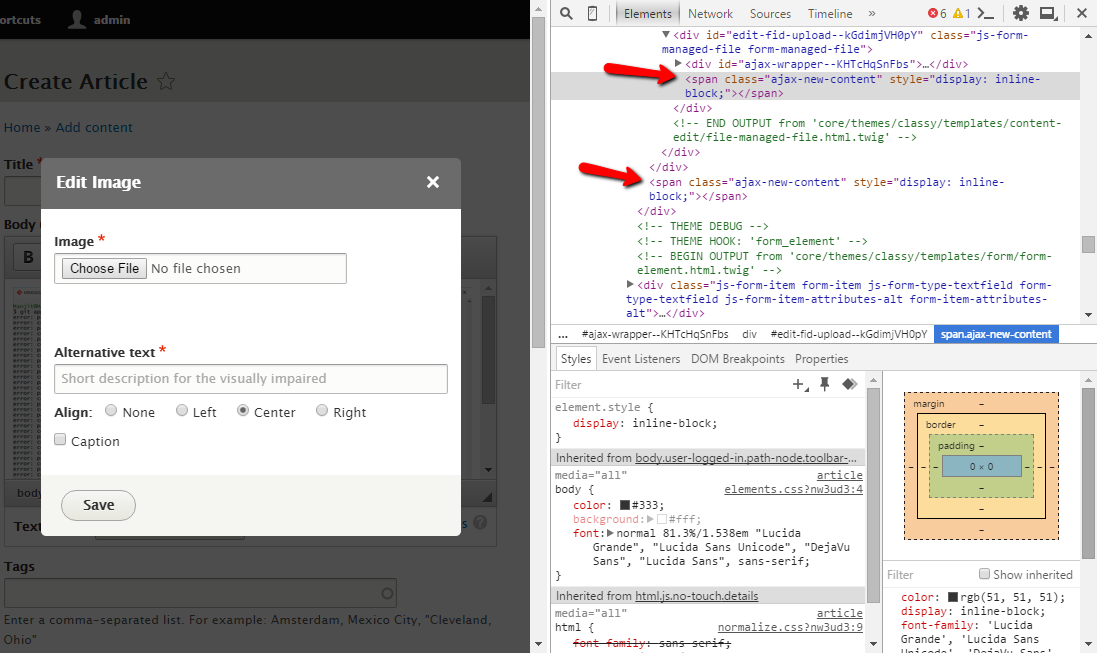
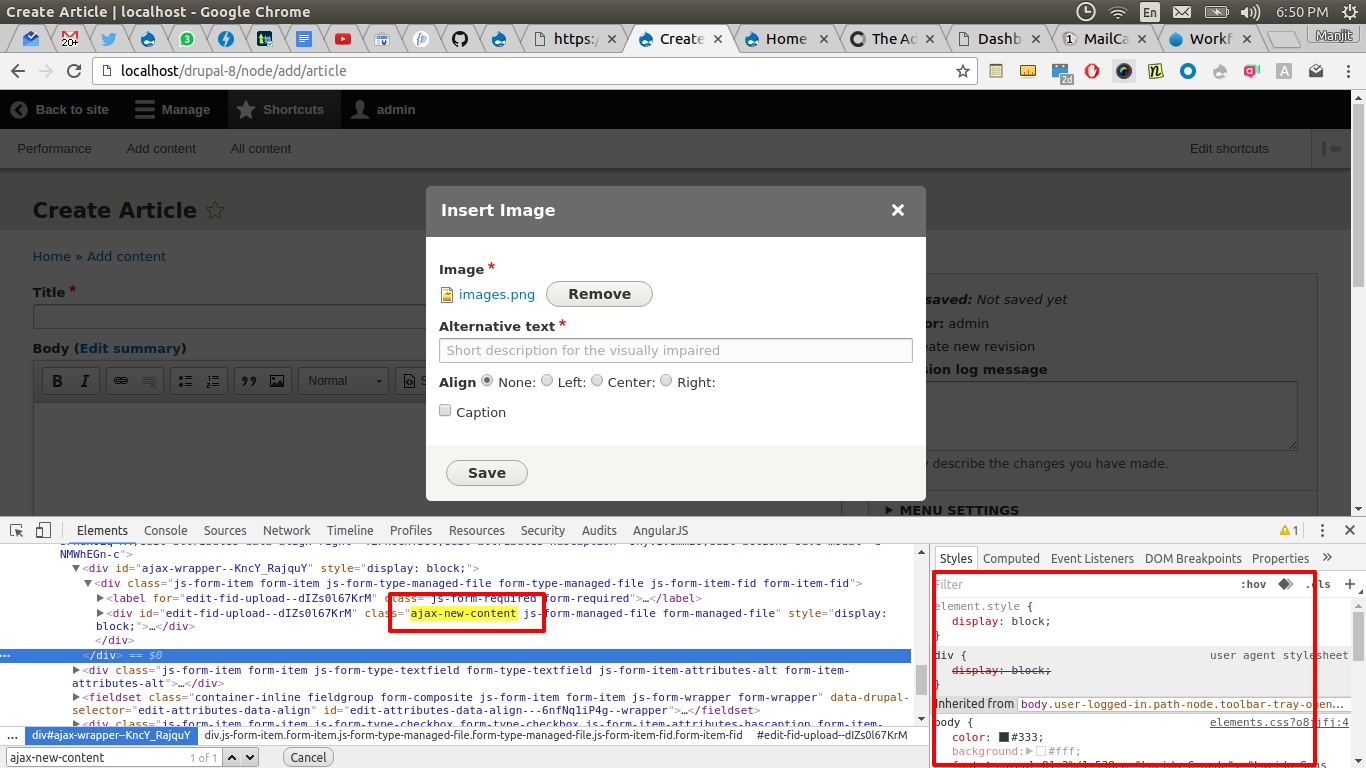
<span class="ajax-new-content" style="display: inline-block;"></span>)do appear in the full node create form. Though I am not able to find the extra space. Screenshot attached.Comment #7
wim leersIt must originate from either
\Drupal\file\Element\ManagedFile::uploadAjaxCallback()or\Drupal\Core\Field\WidgetBase::addMoreAjax(). In this case, it's clearly the first.The fact that you see those same elements appear on the node form without the whitespace problem means that the whitespace problem is caused by CSS. So we'll need to analyze the CSS to find the problem.
A quick test reveals that changing that
display: inline-block;todisplay: none;fixes the problem. But I'm sure that current inline style is there for a good reason. So we must look at the CSS of the surrounding elements. I don't see it yet…Comment #8
wim leersUpdating the title since #6 answered #5, so we can make the title more specific again.
Comment #9
serg2 commentedAre you sure it is a CSS issue rather than JS?
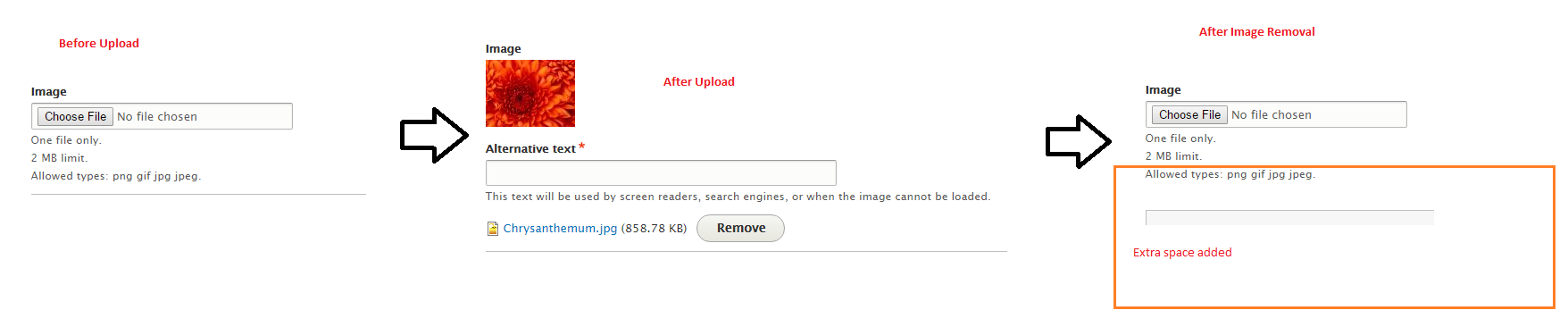
The white space is added on both the modal and the node page.
On the node page it is directly below the the "Allowed types: png gif jpg jpeg."
Clicking "Remove" images seems to adds both:
<span class="ajax-new-content" style="display: inline;"></span><span class="ajax-new-content" style="display: inline-block;"></span>in sequence. This occurs every time Remove is clicked, whether on the modal or node.
Comment #10
manjit.singhyeah, right @Lostandfound !! The same is on node page.
Comment #11
aneek commented@WimLeers, I missed the node creation page, this is also present in the node creation page. Please have a look at the attached image. I had a curious look at it and found that the
new_contentobject coming incore/misc/ajax.jsline # 912 has the "innerHTML" where<span class="ajax-new-content" style="display: inline-block;"></span>is added.So it seems to me that this might be an JS issue but I am not able to find from where the element attribute
style="display: inline-block;"is being added. Changing the title to a generic one that should cover Node Add page and the image editor dialog window.Thanks.
Comment #12
aneek commentedComment #13
manjit.singhIs it possible to changes
<span class="ajax-new-content" style="display: inline-block;"></span>into<span class="ajax-new-content" style="display: inline;"></span>.Because
style="display: inline-block;"added a space. If we can change it as i mentioned earlier then our problem will get resolved.Comment #14
wim leersThis is starting to smell like a
jQuery.hide()-induced problem.Comment #15
aneek commentedA quick patch. @WinLeers I think not only
.hide()but[effect.showEffect](effect.showSpeed)has effects on this too. Since the effects can be dynamic and can have different functions like.hide(),.show()etc. So I've added extra CSS attribute forcefully for inline display.I'd love to hear some reviews from UI guys :)
FYI: Changing the components and other since this is associated with ajax.js. Also this needs some manual testing.
Thanks!
Comment #16
aneek commentedComment #17
sagar ramgade commentedThe approach seems to working, me too tried the same :-)
Comment #18
snehi commented+1 for RTBC Working for me too :)
This should be gone to RTBC.
Comment #19
manjit.singhThanks Aneek !! Looks good now.
Can we remove the unnecessary
span's. Seems like HTML markup is getting to complex. and we don't need that in D8.Comment #20
wim leers#19: that's a separate issue. It's independent from the problem reported here. Can you open a separate issue for that? :) Thanks!
I think this should be reviewed by @nod_ or @droplet, and preferably also by a strong CSS person.
Comment #21
manjit.singhComment #22
wim leersClarifying title.
Comment #23
droplet commentedwhy do we adding an empty placeholder ?
Comment #24
wim leersHAH!
Good question.
We would need an AJAX system expert to know the answer to that. Surely this was there for a reason? Doesn't this break something?
Comment #25
serg2 commentedThese spans are created in Drupal 7 nodes too, both types:
<span class="ajax-new-content" style="display: inline;"></span>and
It was not an issue before because the following css was applied to 'spans':
This CSS was provided by /themes/seven/reset.css . Reset was removed in #723392: Tame seven's reset.css and regressions fixed in #1837514: Fix visual regressions from taming Seven’s reset.
Presumably the same upload/remove functionality was copied from the node to the modal so the issue appears there too.
The AJAX doesn't appear to have changed since 7 but the CSS has, hence the white-space appearing now.
The display regression could be fixed in CSS but probably best to fix/understand what the AJAX is doing.
Comment #26
serg2 commentedFollowing on from #25:
There are already a few issues which are focussed on this bug:
#2302011: Managed file elements get wrapped + nested on each AJAX file upload and #1792032: File validation error message not removed after subsequent upload of valid file
Comment #27
manjit.singhComment #28
anil280988 commentedPatch worked fine for me.
Both the spacing issue from editor as well as Image Fields.
Comment #29
wim leersThis has not yet had sufficient reviews.
Comment #30
droplet commentedYes, needs a AJAX expert to figure out if there's anything do not documented and widely used in popular modules. Reading from code side, it can be removed safely.
Comment #31
wim leersFrom
MAINTAINERS.txt:Therefore assigning to @effulgentsia.
Comment #32
wim leersComment #33
anil280988 commentedAs per the code, this function is called only when a file is successfully uploaded.
Basically, it checks if the file is uploaded and if the current File count is more then the initial count that means file has been uploaded, and it adds 'ajax-new-content' to the attribute.
When the file is removed, the $current_file_count goes decreases so the condition goes to false case.
Which add the as suffix causing the empty space.
I have checked this for upload in both file field and Editor also. And its not impacting anything else.
Comment #34
nod_I'd remove it as well.
Comment #35
tic2000 commentedI investigated a little bit this issue and I found multiple problems with image upload and since it uses mainly the file upload at it's base I assume that's the case for file uploads too.
First,
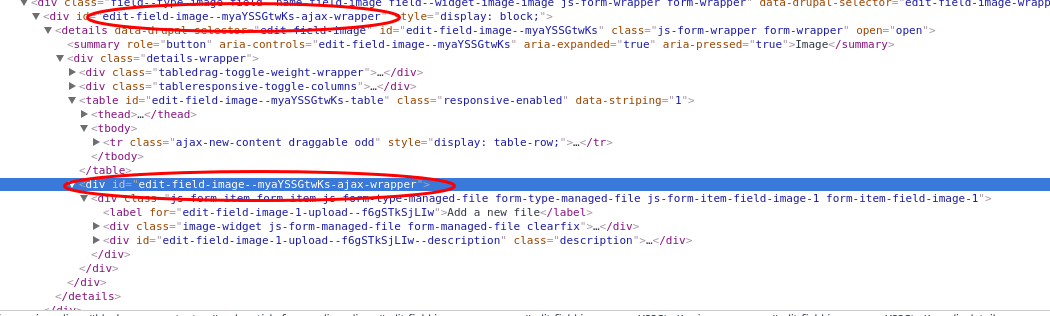
$form['#file_upload_delta']and$current_file_countexist only when we deal with a multiple field widget. Which means in the case of a single image upload we always add the span. The questions are if is that required in case of a single image widget and why that can't be added as a class to the element?A second issue I have is that in the case of single file widget it wraps all in a div with id "ajax-wrapper", but in the case of a multi field it uses "edit-field-image-ajax-wrapper" (the field has an machine name of "field_image"), both of which are not used. What happens is that those are replaced but the command passes NULL.
A third issue is that the IDs in the second issue are replaced with ajax "unique" IDs, which in the case of multiple file widgets gives us this:

I will not talk here about the problem with nested wrapping cause that's because of #736066: ajax.js insert command sometimes wraps content in a div, potentially producing invalid HTML and other bugs.
With the exception of the 3rd issue, all of the other would be solved with smarter AJAX Commands.
IE: No matter what, the whole widget is always fully reloaded. So instead of using a ReplaceCommand use a HtmlCommand on
data-drupal-selector="edit-[field-name]-wrapper". This would solve even the nesting, by always being nested in only one div, and not what it does now.Another solution would be to run one invoke command before the replace which removes
data-drupal-selector="edit-[field-name]-wrapper" span.ajax-new-content. This would not solve the endless nesting though.Comment #36
tic2000 commentedThis needs work because the patch always removes the span. That is added when a file is removed or every time an action is performed on a single file widget. I think there is a reason for it's existence and should not be removed. Even if seven right now doesn't provide a style for it, other themes might use it.
Comment #37
nod_If it was wrapping the HTML of the managed field it would make sense. As it is now it's totally useless.
Comment #38
tic2000 commentedOr we could just add the class to the container.
While working with this I noticed that the messages are added twice, one before the container and once before the upload element. There is an issue opened for that?
Comment #40
sumthief commentedHi. Have the same problem in Drupal 7.
Looks like patch from #38 works good and solves the problem.
Here is patch for Drupal 7.43 version. Maybe it will be helpfull for somebody.
Comment #42
manjit.singh@Shlyapkin It seems like you have created a patch file wrongly.
/docroot/modules/file/file.modulethis path is not exist in Drupal 7. Can you check that please.Comment #43
manjit.singhLooking into #38 and
<span class="ajax-new-content" style="display: inline;"></span>is not going to create anymore. Looks good now. Thanks @tic2000 :)But i was thinking that Is there any need to add ajax-new-content class ? Because there is no style associate with it. Please check the screenshot.
See if we can remove the above code.
suggestions please.
Comment #44
sumthief commented@Manjit.Singh, thank you for the catch.
I've recreated patch for 7.x branch.
Also about your suggestion about class 'ajax-new-content' unnecessary:
I don't sure if D8 have the same logic, but in D7 we have the code snippet in misc/ajax.js:
Looks like this class is the basis of jQuery selector for manipulations with new content.
Comment #46
droplet commentedRE: @tic200 #35 ~ #38,
I still can't see any reason to leave it. Please remind me again if I missed any points.
Let me guess why it's there.
This file introduced from
https://www.drupal.org/node/544418#comment-1932744
(no if-else condition at that time)
Then, it refactored to file field API and introduced if-else
https://www.drupal.org/node/391330#comment-1974982
There is 3 reason I think:
1. PHP Developers assumed if there's any content, we join the string. Otherwise, left as it with if-else condition.
2. Addition to Point 1, they don't know what that is also. Or say they don't mind what that is. I always see these happened in big refactoring commits really.
3. PHP Developers made an assumption that may use or cause script syntax error in the following code:
$('.ajax-new-content', new_content).lengthComment #47
msankhala commentedComment #50
nod_I agree with @droplet, the span should be removed. Adding the class to the whole form is a little dangerous and i don't see the use for it.
Let's see if anything breaks.
Comment #54
martijn de wittriggered new test for latest patch.
Comment #59
guypaddock commentedThis part of the code changed in Drupal 7.76 as part of #2975433: Notices/warnings from attempted exploitation of SA-CORE-2018-002 and SA-CORE-2018-004. Attached is a re-roll of the patch from #50 made against 7.78.
Comment #63
larowlanDaily triage target for bugsmash
Comment #64
arunkumarkRe-rolled the patch from 7.x to work with 9.5.x.
Comment #65
lendudeUpdated the IS with the proposed fix.
We have javascript maintainers signing off on this path.
We have dedicated javascript coverage for this element in \Drupal\Tests\file\FunctionalJavascript\FileManagedFileElementTest that doesn't break by removing this.
Adding additional tests seems unnecessary since we are only removing code and this has code coverage already.
Based on that I'm marking this RTBC.
Comment #66
lendudeComment #67
larowlanFor posterity, here's the salient bits I considered in my review
We start with this chunk in the ManagedFile element callback:
In my reading of that, we could end up with a scenario where $form is something like this
And then we get to the JavaScript
As you can see, it starts by hiding the returned content. Then if there's any content inside that new content that has .ajax-new-content on it, we apply the effect to that element.
But if there's not, and we've already hidden the returned content, we apply it to the outer parent.
So the essence of this change, rather than return an empty span and apply the effect there, we're applying the effect to the complete returned content, which in this case could now include messages, but previously was limited to just the single span.
I think that's reasonable, as it will animate any error messages, rather than an empty span.
Comment #68
larowlanUpdating issue credits and adding a 10.x test run
Comment #69
larowlanInadvertent status change
Comment #72
larowlanCommitted to 10.1.x, backported to 10.0.x and 9.5.x
I don't think there's any risk of disruption here, but I think this is minor enough not to worry about backporting to 9.4.x