Windows permissions
This page will show you how to change the file permissions on a Windows server.
Through a GUI
On Windows 2003 with IIS
- Navigate to the file or folder that needs its permissions changed.
- Right-click on the file or folder and click on Properties.
- Select the Security tab.
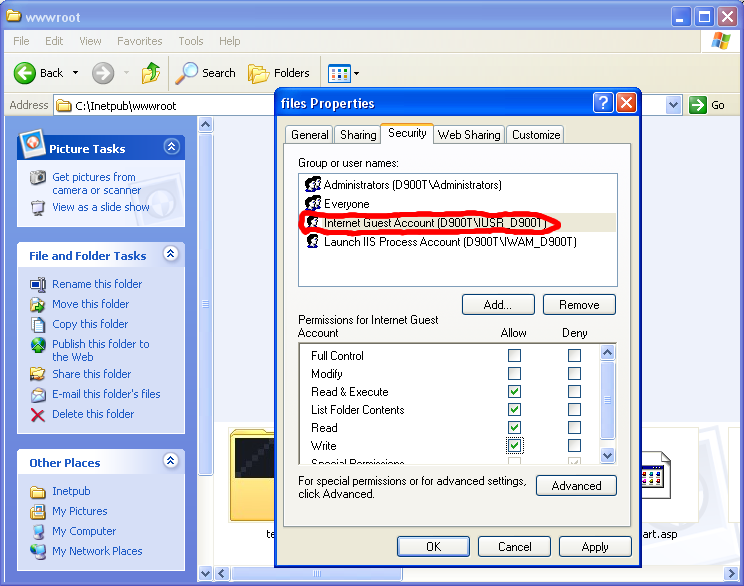
- Click on the Internet Guest Account and make sure that the Allow checkbox is set for Write permissions.
On Windows XP with IIS
Windows XP's security tab is hidden by default, so before the permissions can be set you need to:
- Go to My Computer.
- Click on the Tools>Folder Options menu item.
- Select the View tab.
- Under Advanced settings, Scroll down to the bottom and uncheck Use simple file sharing (Recommended).
- Click Ok.
- Navigate to the file or folder that needs its permissions changed.
- Right-click on the file or folder and click on Properties.
- Select the Security tab.
- Click on the Internet Guest Account and make sure that the Allow checkbox is set for Write permissions.

 Note: You need to be aware of the fact that there are not only NTFS file system permissions, but also IIS configuration options that can disable permissions regardless of the NTFS file system settings, but this should not be a problem for those not running their own servers. You can read more about IIS on Microsoft's website.
Other access methods
If you do not have access to the windows GUI, then your web host has probably set up a web-based interface to enable you to change permissions, in that case, make sure that the write permission is enabled. If you are not sure about what to do, contact your web host and ask them to enable PHP scripts (Drupal) to write to C:\\site directory\files or .
External links
Here are links to either more information or alternate instructions to change permissions.
How to set required NTFS permissions and user rights for an IIS 5.0 Web server - Microsoft.com
How to configure Web server permissions for Web content in IIS - Microsoft.com
Instructions with screenshots, from the Coppermine website
A blog post on with instructions for changing permissions on Windows 2003 or XP
Note: You need to be aware of the fact that there are not only NTFS file system permissions, but also IIS configuration options that can disable permissions regardless of the NTFS file system settings, but this should not be a problem for those not running their own servers. You can read more about IIS on Microsoft's website.
Other access methods
If you do not have access to the windows GUI, then your web host has probably set up a web-based interface to enable you to change permissions, in that case, make sure that the write permission is enabled. If you are not sure about what to do, contact your web host and ask them to enable PHP scripts (Drupal) to write to C:\\site directory\files or .
External links
Here are links to either more information or alternate instructions to change permissions.
How to set required NTFS permissions and user rights for an IIS 5.0 Web server - Microsoft.com
How to configure Web server permissions for Web content in IIS - Microsoft.com
Instructions with screenshots, from the Coppermine website
A blog post on with instructions for changing permissions on Windows 2003 or XP